Why did the Download button suddenly disappear? Why are your downloaded HBO Max shows no longer available even though you haven't finished watching them? Or why can't you download HBO Max videos to your Windows PC or Mac at all?
All of these issues relate to the official download limits set by HBO Max. While the service supports offline viewing, the feature comes with various hidden "pitfalls" regarding subscription plans, download quotas, supported devices, expiration periods, and more. Understanding these limitations is the key to mastering the HBO Max offline experience.
In this guide, we will break down the latest HBO Max download limits for 2026 and explore alternative solutions for when these restrictions don't quite meet your needs.
For most users, the biggest HBO Max download limitations are download quotas, expiration periods, and the lack of Windows and Mac support. To give you a quick overview, we've summarized the key restrictions in the table below.
| Category | Current Limit |
|---|---|
| Supported Plans | Standard & Premium only (Basic with Ads doesn't support downloads) |
| Maximum Downloads | Up to 30 downloads (Standard) / Up to 100 downloads (Premium) |
| Movies | Up to 30 downloaded movies |
| TV Episodes | Up to 25 episodes from the same series |
| Supported Devices | iPhone, iPad, Android phones, Android tablets, Amazon Fire tablets |
| Windows / Mac | ❌ Not supported for official downloads |
| Download Expiration | Usually expires after 30 days if not watched |
| Viewing Expiration | Usually expires 48 hours after playback begins |
| File Format | ❌ Encrypted files that cannot be copied or converted |
Clearly, these limitations affect your experience when using the offline download feature. For instance, downloading an entire season of a show can quickly exhaust your available download quota. Furthermore, downloaded content may automatically disappear if not watched within a specified timeframe.
Additionally, HBO Max does not support offline downloads on Windows or Mac computers. The download feature is restricted to mobile devices, and downloaded content is stored in an encrypted format that can only be played within the official HBO Max app.
If you are simply downloading a few movies before a trip, these limitations generally won't be a major issue. However, if you wish to watch content across multiple devices or keep downloads for later viewing, the official offline feature may not meet those needs.
![Download HBO Max Videos to MP4 in 2026 [Fast & Easy]](/images-new/guide/hbomax/download-hbo-max-video-to-mp4.jpg)
Learn how to download HBO Max video to MP4 in 2026. Follow a step-by-step guide to save HBO Max videos as MP4 files with the best HBO Max video downloader.
The short answer is content licensing. Indeed, these restrictions are annoying; after all, you’ve paid for the service, yet you’re still hemmed in by so many rules. However, it is worth understanding the reasons behind them.
Unlike purchased movies, most HBO Max titles are licensed from studios under specific distribution agreements. These agreements determine how content can be downloaded, where it can be played, and how long it can remain available offline.
To enforce these rules, HBO Max relies on Digital Rights Management (DRM), which encrypts downloaded videos and ties them to your account. This is why official downloads aren't standard MP4 files and can only be played within the HBO Max app.
As a result, restrictions such as download quotas, expiration periods, and device limitations aren't independent rules—they're all part of the same licensing system designed to protect copyrighted content while allowing offline viewing.
Officially, the answer is no. HBO Max does not offer options to remove download restrictions or lift rules regarding expiration dates, download quotas, or device limits.
However, that doesn't mean you are completely out of options.
By saving movies and shows as standard MP4 or MKV files, you can bypass HBO Max's offline viewing limitations.
NoteBurner HBO Max Video Downloader is one of the most popular solutions. It allows you to batch-download movies and TV shows from HBO Max to your Windows PC or Mac while preserving 1080p HD quality, multilingual audio tracks, and subtitles. Most importantly, since the files are stored locally, you won't have to worry about download expiration or losing access due to changes in your subscription status. You can also transfer the videos to other devices, such as smartphones or tablets, for viewing.

| Official HBO Max Downloads | With NoteBurner 🏆 |
|---|---|
| Expire after a limited time | Saved permanently on your computer ✅ |
| Encrypted app-only files | Save as MP4 or MKV ✅ |
| Can't transfer to other devices | Watch on computers, TVs, tablets, phones, USB drives, and more ✅ |
| Limited by download quotas | Build your own offline library without HBO Max download limits ✅ |
Step 1 Select Website
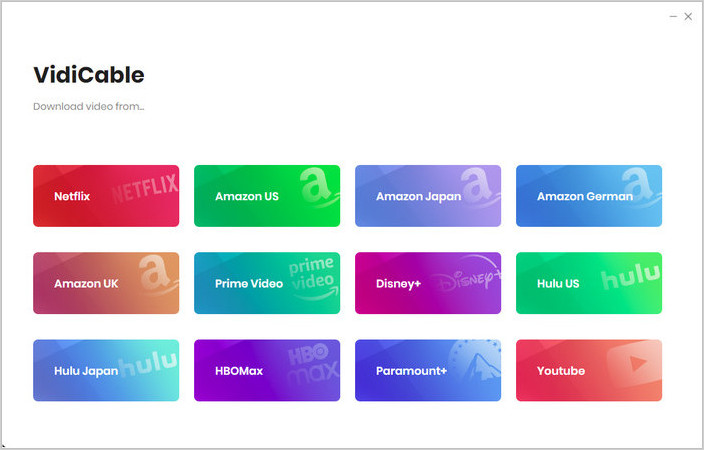
On the main interface, choose the HBO Max platform. A built-in browser will open and take you directly to HBO Max's official website.
Click "More Sites" to explore 1,000+ supported websites, sorted by name or genre.
Step 2 Customize Download Settings
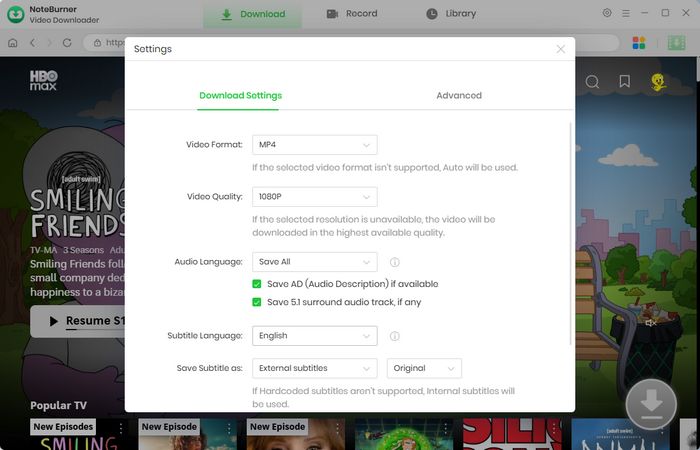
Click the  button in the upper right corner to customize the video quality, video format (MP4, MKV), and output path.
Step 3 Add Preferred Movies
You can enter a keyword or the full name of the movie or TV show you're looking for in the search box. A list of matching results will appear. You can also browse through categories or featured content to find the videos you want to download.
Step 4 Customize Video Quality and Subtitles
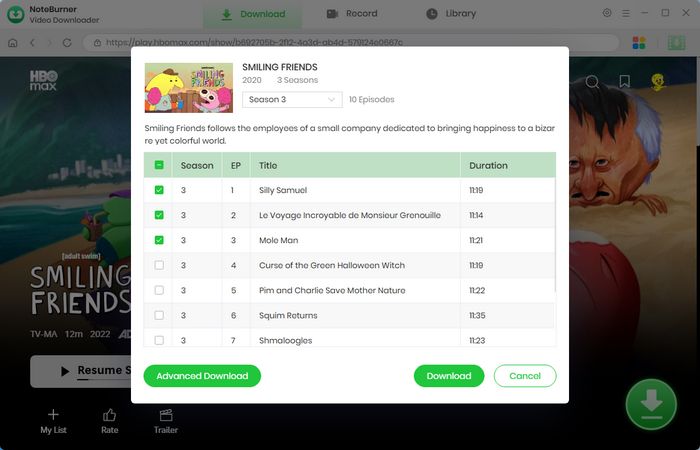
After locating the video you wish to download, click the "Advanced Download" button. A pop-up window will appear, allowing you to choose the video quality, audio tracks, and subtitles.
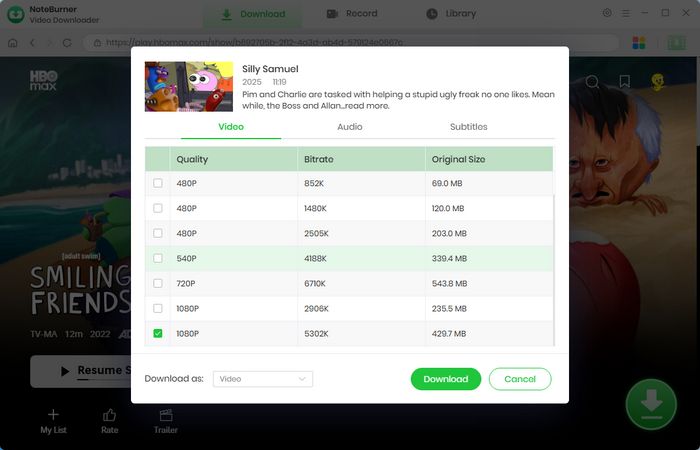
Step 5 Start Downloading Video to Computer
Now simply click the "Download" icon to save the video to the output folder you selected in the previous step.
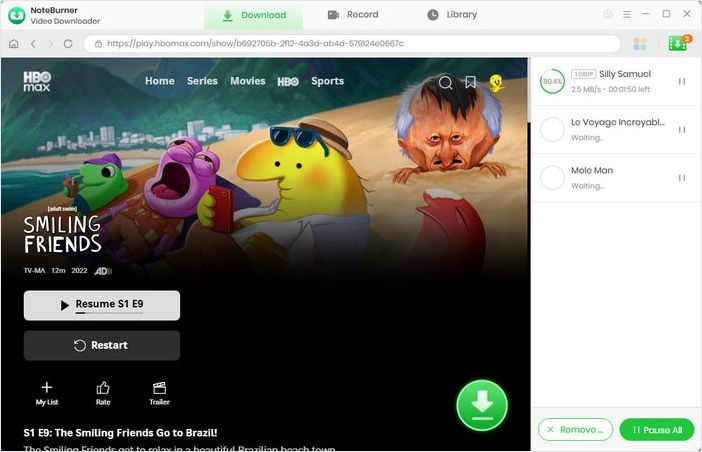
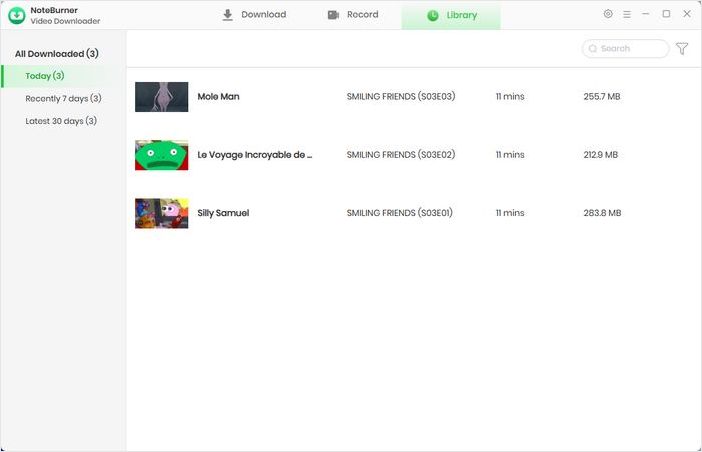
Step 6 Find the Downloads
Go to the "Library", and you will see that all downloaded videos are organized by download date. You can now watch HBO Max offline or transfer them to iPhone, Android, Smart TV, USB drive, media player and more.
Disclaimer: For personal and educational use only. 🚫 Do not distribute downloaded video for commercial use.
If the Download button isn't showing, there are several possible reasons. The most common are using the Basic with Ads plan, accessing HBO Max from a web browser or unsupported device, or trying to download a title that isn't available for offline viewing. Make sure you're signed in with a Standard or Premium subscription and using the latest version of the HBO Max mobile app.
Official HBO Max downloads are protected by DRM and are only valid for a limited time. In most cases, you have up to 30 days to start watching a downloaded title. Once playback begins, it usually expires within 48 hours. These expiration rules are part of HBO Max's licensing agreements with content owners.
Not with the official download feature. Downloaded titles eventually expire, and access may also be removed if your subscription ends or the content leaves HBO Max. To keep videos permanently, you'll need to save them as local files on your computer rather than relying on temporary in-app downloads.
HBO Max doesn't support downloading content directly to smart TVs or streaming devices like Roku, Apple TV, Chromecast, or Fire TV. The offline download feature is only available on supported mobile devices, including iPhones, iPads, Android phones, Android tablets, and Amazon Fire tablets. If you want to watch downloaded HBO Max videos on a TV, you'll need to download them to a computer first and then play or transfer the local video files to your TV.
While HBO Max's download limitations may be inconvenient, the reasons behind them make sense. Although you cannot directly remove the platform's official download restrictions, there is a practical workaround: save HBO Max videos as local MP4 or MKV files using a dedicated downloader. You can easily do this with NoteBurner HBO Max Video Downloader. Follow the tutorial in this article to enjoy a true offline viewing experience!
Note: Only the first 5 minutes of each video can be downloaded with the trial version. Please purchase a license to access full downloads. We recommend testing the trial version before making a purchase.