In short, the answer is no.
HBO Max allows users to watch offline through its app, but the downloaded content is not saved as MP4 files. Instead, the videos are stored in an encrypted format protected by DRM. This means the videos cannot be moved, edited, or played outside the platform.
For users who want more flexibility, this limitation often raises a practical question: Is there a way to save HBO Max videos as MP4 files for wider offline use?
Absolutely! This article will show you how to easily and quickly convert HBO Max movies and TV shows to MP4. Let's get started.

Whatever your reason for wanting to download HBO Max to MP4, you'll find that you gain much more flexibility than with HBO Max's built-in download feature. Although official downloads are intended for short-term viewing offline, MP4 files allow users to decide when, where, and how to watch content. Let’s make a comparison of HBO Max’s official downloads vs. typical MP4 files.
| Feature | HBO Max Downloads | MP4 Files |
|---|---|---|
| Playable Outside HBO Max | ❌ | ✅ |
| Permanent Access | ❌ | ✅ |
| Transfer to Other Devices | ❌ | ✅ |
| Store on USB Drive | ❌ | ✅ |
| Works with VLC & Other Players | ❌ | ✅ |
| Standard Video Format | ❌ | ✅ |
As you can see, HBO Max downloads are mainly intended for temporary viewing within the app, while MP4 files provide much greater flexibility and long-term accessibility.
MP4 is the world's most widely supported video format. Once an HBO Max video is saved as an MP4 file, it can be played on Windows PCs, Macs, Android devices, iPhones, iPads, smart TVs, tablets, game consoles, and most media players without compatibility concerns.
Official HBO Max downloads may become unavailable due to expiration rules, account changes, or subscription status. MP4 files provide a more dependable way to access your downloaded content whenever you need it.
Unlike app-based downloads, MP4 files can be moved between devices with ease. You can save them to USB drives, external hard disks, or NAS storage.
MP4 files are easier to organize and manage. You can sort videos into folders, archive your favorite content, and access your collection without opening the HBO Max app.
Modern HBO Max downloaders can preserve excellent video quality while saving content as MP4 files. This allows you to enjoy a smooth viewing experience without sacrificing picture quality.
![How to Download HBO Max Videos for Offline Viewing [PC & Mobile]](/images-new/guide/hbomax/download-hbo-max-videos-offline-pc-mobile.jpg)
Learn the best way to download HBO Max videos on your phone, PC, or Mac. Bypass restrictions and save as MP4 for permanent offline viewing.
Now, let’s get to the main topic of this article—how to convert HBO Max videos to MP4 format.
For security and stability reasons, I don’t recommend using online HBO Max video downloaders, as they often contain ads and redirects, and may lead to download failures or even 404 errors. Therefore, it is better to use a dedicated HBO Max video downloader - NoteBurner HBO Max Video Downloader, which offers greater security, stability, and efficiency. In addition to this, it has the following functions:

Step 1 Select Website
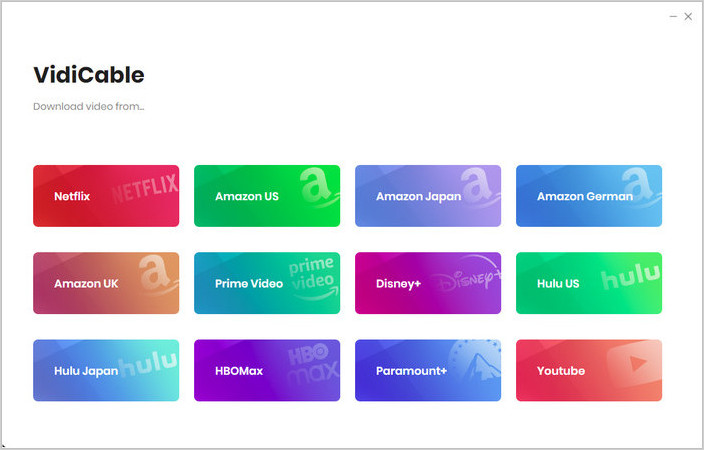
On the main interface, choose the HBO Max platform. A built-in browser will open and take you directly to HBO Max's official website.
Click "More Sites" to explore 1,000+ supported websites, sorted by name or genre.
Step 2 Customize Download Settings
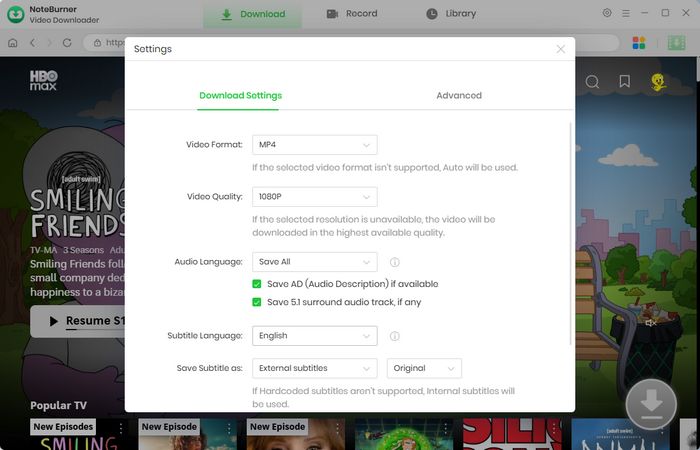
Click the  button in the upper right corner to customize the video quality, video format (MP4, MKV), and output path.
Step 3 Add Preferred Movies
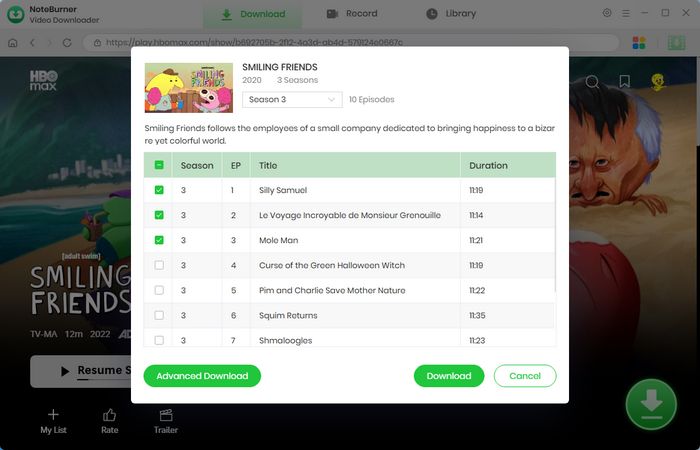
You can enter a keyword or the full name of the movie you're looking for in the search box. A list of matching results will appear. You can also browse through categories or featured content to find the videos you want to download.
Step 4 Customize Video Quality and Subtitles
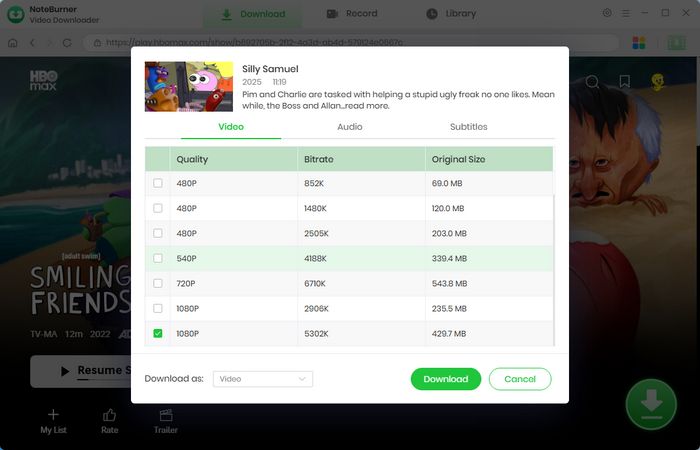
After locating the video you wish to download, click the "Advanced Download" button. A pop-up window will appear, allowing you to choose the video quality, audio tracks, and subtitles.
Step 5 Start Downloading Video to Computer
Now simply click the "Download" icon to download the video to the output folder selected in the previous step.
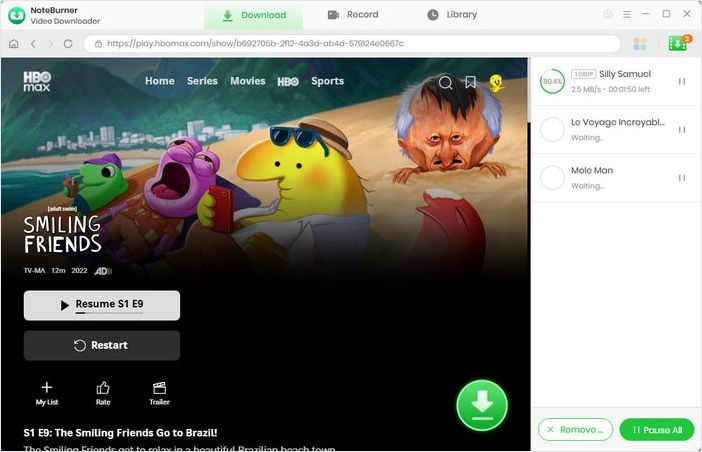
Step 6 Find the Downloads
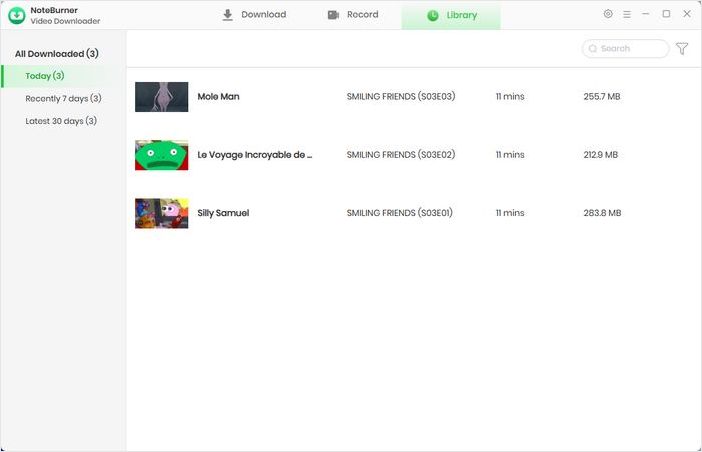
Go to the "Library", and you will see that all downloaded videos are organized by download date. You can now watch HBO Max offline or transfer them to iPhone, Android, Smart TV, USB Drive, Media Players and more.
Disclaimer: For personal/educational use only. 🚫 Do not distribute downloaded video for commercial use.
| Feature | Official Download | NoteBurner MP4 Download |
|---|---|---|
| Offline Viewing | Yes✅ | Yes✅ |
| Play Outside HBO Max App | No | Yes✅ |
| Transfer to Other Devices | No | Yes✅ |
| Save to USB Drive | No | Yes✅ |
| Permanent Access | Limited | Yes✅ (No expiration limits, permanent access) |
| Standard Video Format | No | MP4✅ |
| Subtitle Options | Limited | Multiple Options✅ |
| Batch Download | No | Yes✅ |
Official HBO Max downloads cannot be copied or transferred because they are encrypted and tied to the HBO Max app. However, if you save HBO Max videos as MP4 files, you can easily transfer them to a USB drive, external hard disk, NAS device, or another computer for offline viewing.
No. MP4 is simply a video container format and does not automatically reduce quality. Many HBO Max downloaders can preserve HD video quality while saving content as MP4, allowing you to enjoy smooth playback without noticeable quality loss.
Yes. HBO Max's official download feature is primarily designed for mobile devices. If you want to save HBO Max videos on a Windows PC or Mac, you'll need a dedicated downloader that can store movies and shows as local MP4 files for offline viewing.
You may find free HBO Max to MP4 APKs online, but their reliability varies significantly. Some may contain excessive ads, broken download functions, or potential security risks. Always verify the source before installing any third-party APK.
Some HBO Max downloaders provide free trials that let you test their features before purchasing. While completely free tools exist, they often come with limitations such as slower speeds, lower output quality, download limits, or reduced stability.
In this article, we started from the limitations of HBO Max’s official download feature and the key benefits of converting HBO Max videos to MP4, such as universal compatibility, permanent access, and easy transfer across devices. Then, we provided a step-by-step guide on how to download HBO Max videos to MP4 using NoteBurner HBO Max Video Downloader.
If you're ready, click the download button below to get started with the HBO Max video downloader.
Note: Only the first 5 minutes of each video can be downloaded with the trial version. Please purchase a license to access full downloads. We recommend testing the trial version before making a purchase.