While watching HBO Max online is convenient, offline viewing is essential in many situations. For example, long flights, commutes with unstable internet connections, or simply wanting to watch your favorite shows anytime, anywhere, all require downloading HBO Max videos.
I've personally used both HBO Max's official download function and dedicated HBO Max video downloaders. While the built-in download function works well for temporary offline viewing on supported mobile devices, its limitations become apparent when I want to watch content on a laptop, transfer videos to other devices, or save downloaded content for extended periods.
In this guide, I'll walk you through both methods, explain their differences, and help you choose the best way to download HBO Max videos for offline viewing on PCs, Macs, iPhones, Android devices, and more.
Yes, HBO Max allows eligible subscribers to download movies and TV shows for offline viewing. To use the official download feature, you typically need: an eligible HBO Max subscription plan, the HBO Max mobile app, and supported iPhones, iPads, Android phones, or Android tablets.
Before downloading, it's important to understand that HBO Max imposes several restrictions on offline downloads.
| Feature / Limitation | Basic with Ads | Standard | Premium |
|---|---|---|---|
| Offline Download | No | Yes | Yes |
| Total Downloads (All Devices) | 0 | 30 | 100 |
| Movie Downloads Limit | N/A | 30 | 30 |
| Max Episodes per Same Series | N/A | 25 | 25 |
| Supported Device Type | N/A | Phone / Tablet Only | Phone / Tablet Only |
| Windows / Mac Download | No | No | No |
| Download Format | N/A | Encrypted | Encrypted |
| Keep Videos Permanently | No | No (30 days / 48h rule) | No (30 days / 48h rule) |
| Transfer to Other Devices | No | No | No |
| Save to SD Card | No | No | No |
As you can see, HBO Max downloads are primarily designed for temporary offline viewing within the HBO Max app. If you need greater flexibility, you'll likely need an alternative solution.
⬇️ No limits on quantity or devices. Save HBO Max videos forever with NoteBurner HBO Max Video Downloader.
Due to official restrictions, you cannot directly download HBO Max videos for offline viewing on a Windows PC or Mac. This is where NoteBurner HBO Max Video Downloader comes in. Unlike the official HBO Max app, NoteBurner allows users to download HBO Max movies and TV shows to their computers in MP4 and MKV formats. This means that downloaded HBO Max videos can not only be played on your computer but also transferred to your phone, tablet, SD card, USB drive, and other devices.

Step 1 Select Website
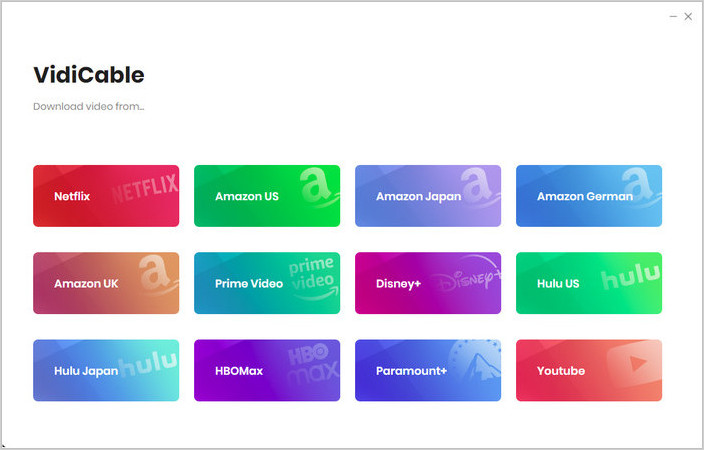
On the main interface, choose the HBO Max platform and a built-in browser will open and take you directly to HBO Max's official website.
Click "More Sites" to explore 1,000+ supported websites, sorted by name or genre.
Step 2 Customize Download Settings
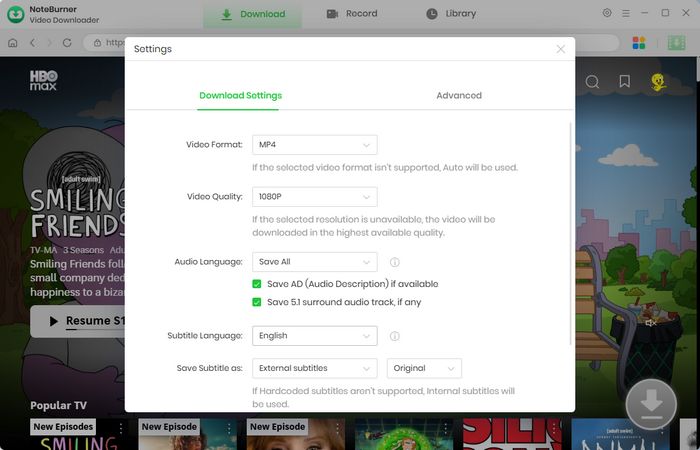
Click the  button in the upper right corner to customize the video quality, video format (MP4, MKV), and output path.
Step 3 Add Preferred Movies
You can enter a keyword or the full name of the movie you're looking for in the search box. A list of matching results will appear shortly. You can also browse through categories or featured content to find the videos you want to download.
Step 4 Customize Video Quality and Subtitles
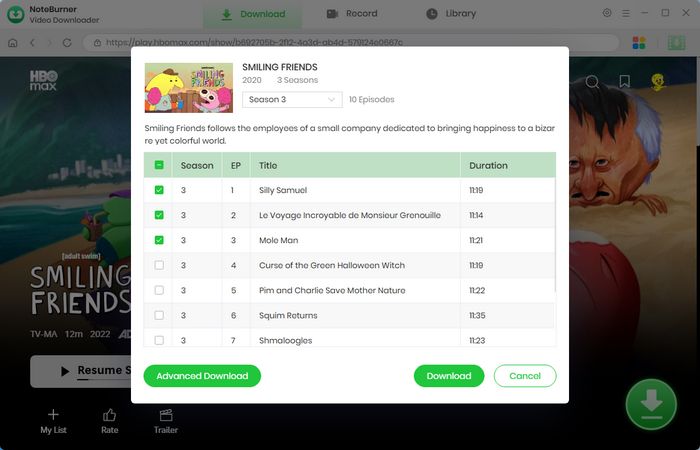
After locating the video you wish to download, click the "Advanced Download" button. A pop-up window will appear, allowing you to choose the video quality, audio tracks, and subtitles.
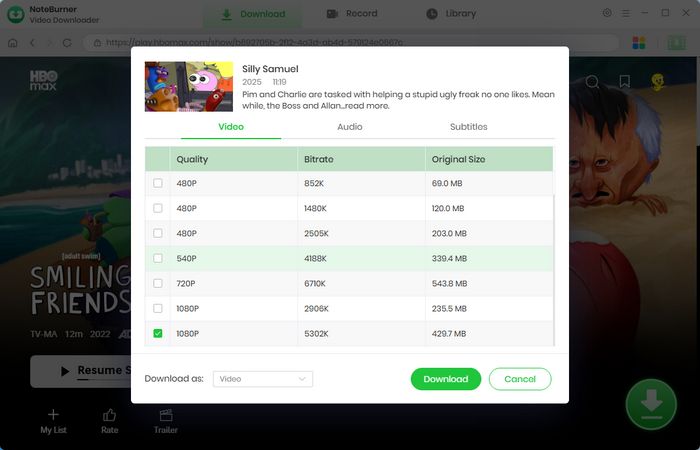
Step 5 Start Downloading Video to Computer
Now, simply click the "Download" icon to start downloading the video to the output folder you selected in the previous step.
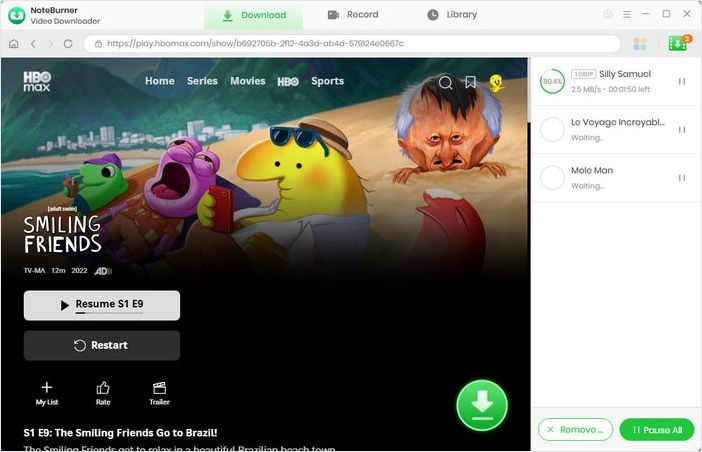
Step 6 Find the Downloads
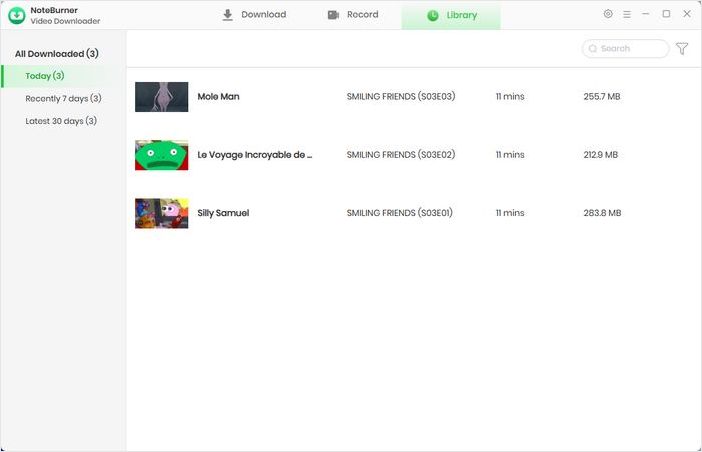
Go to the "Library", and you will see that all downloaded videos are organized by download date. You can now watch HBO Max offline or transfer them to iPhone, Android, Smart TV, USB Drive, Media Players and more.
Disclaimer: For personal/educational use only. 🚫 Do not distribute downloaded video for commercial use.
![Download HBO Max Videos to MP4 in 2026 [Fast & Easy]](/images-new/guide/hbomax/download-hbo-max-video-to-mp4.jpg)
Learn how to download HBO Max video to MP4 in 2026. Follow a step-by-step guide to save HBO Max videos as MP4 files with the best HBO Max video downloader.
The official HBO Max download feature is the easiest way to save HBO Max movies and shows for temporary offline viewing. Below are the officially supported devices for downloading HBO Max videos:
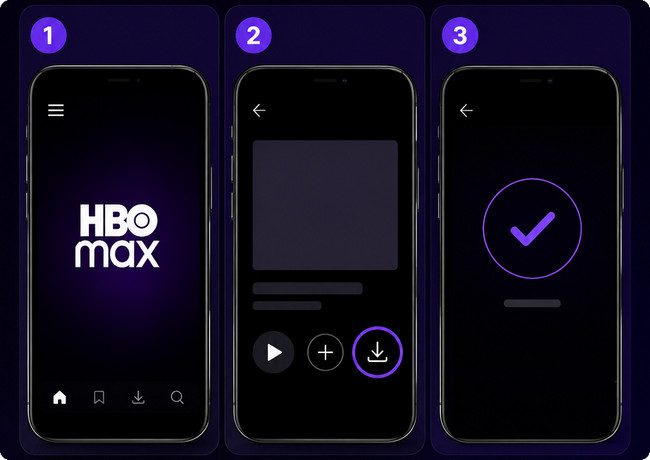
Step 1 Download and install the HBO Max app from the App Store or Google Play Store.
Step 2 Log in using your HBO Max account credentials.
Step 3 Browse the library and select a movie or TV show. If the title supports downloads, you'll see a "Download" icon. To check which languages are available for a title, tap the Play icon and then select the Audio and Subtitles icon in the video player.
Step 4 Tap the Download button and wait for the download process to complete.
Step 5 Navigate to the Downloads section inside the HBO Max app to access your saved content without an internet connection.
Now you might be wondering: How does the official method compare to NoteBurner? The table below highlights the key differences in device support, output formats, download limitations, and offline playback flexibility, giving you a clear overview.
| Feature | Official HBO Max | NoteBurner HBO Max Downloader |
|---|---|---|
| Mobile Download | ✅ Yes | ✅ Yes (via transfer) |
| Computer Download | ❌ No | ✅ Yes |
| Download Quantity Limit | ⚠️ Yes 30-100 total (Standard/Premium) 25 episodes per series | ✅ No limit |
| MP4/MKV Output | ❌ No (encrypted only) | ✅ Yes |
| Transfer Videos to Other Devices | ❌ No | ✅ Yes |
| Offline Playback Expiration | ⚠️ Yes • 30 days if unwatched • 48 hours after starting playback | ✅ No expiration |
| Batch Download | Limited (one by one) | ✅ Yes (multiple at once) |
| Subtitle & Audio Options | Basic • Original audio track • Last selected language (if available) • English CC only | ✅ Advanced • All subtitle tracks • Keep original or select any language |
| Overall Offline Flexibility | Low (locked to app + device) | ✅ High (save & transfer freely) |
⬇️ NoteBurner HBO Max Video Downloader is right for you? Download and use it now.
What might be going on:
How to fix it:
What might be going on: Your download quality is set to "Good" by default, which saves space but looks less sharp.
How to fix it: Head to Settings > App Settings > Download Settings and change the video quality to "Better" or "Best" — you'll notice a big difference.
What might be going on:
How to fix it:
What might be going on:
How to fix it:
Official: No. Official downloads are encrypted and tied to your account and specific device. They cannot be transferred or shared.
With NoteBurner: NoteBurner downloads HBO Max videos as DRM-free MP4 files. The downloaded videos can be transferred and played on your personal devices for offline viewing.
Official: No. Official downloads are only available on iPhone, iPad, Android phones, and Android tablets. No PC/Mac support.
With NoteBurner: Yes. NoteBurner works directly on Windows PC and Mac, allowing you to download HBO Max videos and save them as MP4 for offline playback on any device.
Here is the solution to download the Amazon Prime video to your computer for offline stream. Follow this guide and learn how to use Amazon Video Downloader to download any Prime videos to computer.
In this guide, we've explored two effective ways to download HBO Max videos for offline viewing: the well-known official method and a more flexible method with no episode limits, no viewing time limit, and cross-device support.
If you only need to watch temporarily offline on your mobile device, HBO Max's built-in download function is sufficient. If you want to download HBO Max movies and shows to your PC or Mac and save the content as MP4 or MKV format for easy video transfer, then a dedicated solution like NoteBurner HBO Max Video Downloader is your best choice.
Note: Only the first 5 minutes of each video can be downloaded with the trial version. Please purchase a license to access full downloads. We recommend testing the trial version before making a purchase.