>
Video Downloader Tips >Built on a powerful yt-dlp core
>
Video Downloader Tips >Built on a powerful yt-dlp core
Streaming video downloaders are not one-size-fits-all. The best streaming video downloader depends on your device, the platform you want to download from, and the features you need. Some tools are perfect for quick browser downloads, while others are built for 4K quality, batch downloads, and even DRM-protected streaming platforms like Netflix. In this guide, we’ll cover the most useful downloader types—from online tools to professional desktop software and powerful command-line solutions—so you can quickly find the right one for your needs.
Take a moment to review the table below for a clear, side-by-side comparison of the top 8 video downloaders. It highlights the key specs at a glance. For a deeper dive into each tool, simply click on its name to read the full breakdown.
| Tool | Supported Platforms | OS | Mode | Quality | DRM Content | Price |
| NoteBurner All-In-One Video Downloader | Netflix, Disney+, Prime Video, YouTube, TikTok, 1000+ sites | Windows / macOS | Download + Record | Up to 8K for YouTube, 1080P for others | Supports DRM content | Paid (Trial available) |
| yt-dlp | YouTube, Vimeo, Twitch, Bilibili, many more | Windows / macOS / Linux | CLI Download | Custom Quality | No DRM support | Free |
|
VideoProc Converter AI |
YouTube, Twitch, Netflix, Hulu, 1000+ sites | Windows / macOS | Download + Convert + Record | Up to 8K + AI Enhance | Supports DRM platforms | Paid |
| Seal | YouTube, TikTok, Instagram, Facebook, 1700+ sites | Android | Download | Up to 1080P | No DRM support | Free |
|
4K Video Downloader Plus |
YouTube, Vimeo, TikTok, Facebook, Twitch, Bilibili | Windows / macOS / Linux | Download + Auto Download | Up to 8K UHD | No DRM support | Paid |
| VtoSave | YouTube, Facebook, Instagram, TikTok, Twitter | Web-based | Online Download | Up to 1080P | No DRM support | Free |
| Movavi Screen Recorder | Any streaming site with screen playback | Windows / macOS | Record + Download | Up to 4K / 60fps | Bypasses DRM | Paid |
| Internet Download Manager (IDM) | Browser-supported video websites | Windows | Download | Up to 1080P | No DRM support | Paid |
⭐ Editor's Choice: If you need an all-in-one solution for both regular streaming sites and DRM-protected platforms like Netflix, Disney+, and Amazon Prime Video, NoteBurner All-In-One Video Downloader is the most recommended option. It offers 5X faster downloading, 8X faster recording, support for 1000+ streaming platforms, and high-quality output up to 1080P / 8K for YouTube. For users who want stable quality and flexible offline viewing, it offers the best overall experience in this list.
| Supported Platforms | System | Mode | Video Quality | Audio & Subtitles | Additional Features |
|---|---|---|---|---|---|
|
1000+ Streaming Platforms Netflix, Disney+, Prime Video, YouTube, TikTok... |
Windows / Mac | 5x Download + 8x Record |
Up to 1080P (Up to 8K for YouTube) |
1. Multi-language Audio & Subtitles 2. 5.1 Dolby Atmos |
1. Batch Download 2. Convert Video to Audio |
NoteBurner All-In-One Video Downloader is one of the most powerful streaming video downloaders for users who want to save videos from both DRM-protected platforms and regular streaming websites. Whether you need to download from Netflix, Disney+, Amazon Prime Video, Hulu, YouTube, TikTok, or other popular video platforms, this tool handles everything in one place.
Its biggest advantage is the combination of 5X faster video downloading and 8X faster video recording, allowing you to save and record videos much more efficiently than traditional tools. With the built-in browser, you can browse, download, and record videos directly inside the program—no need to switch between tabs or use extra software. It also supports HD video quality up to 1080P (up to 8K for YouTube), MP4/MKV output, multi-language audio tracks, subtitles preservation, and even 5.1 Dolby Atmos surround sound for a better offline viewing experience.

Step 1 Click the  icon in the upper-right corner and select Netflix from the supported platforms. It will open directly in the built-in browser. Sign in to your Netflix account to access the videos you want to download.
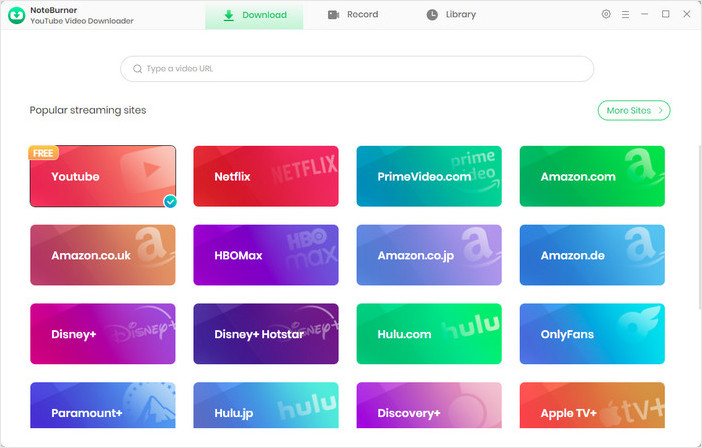
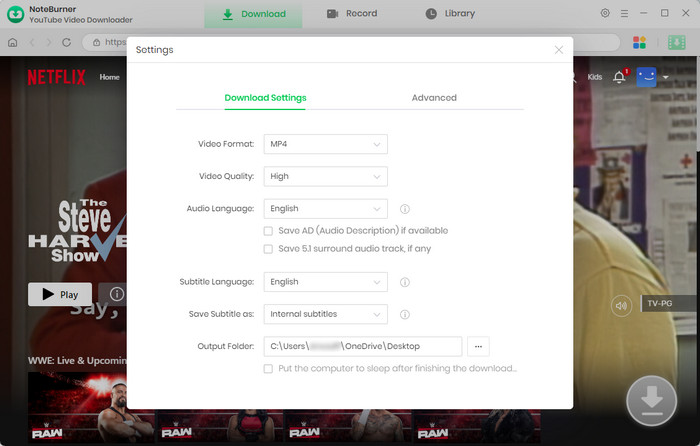
Step 2 Click the  button to set the video format (MP4/MKV), output quality, and save location.
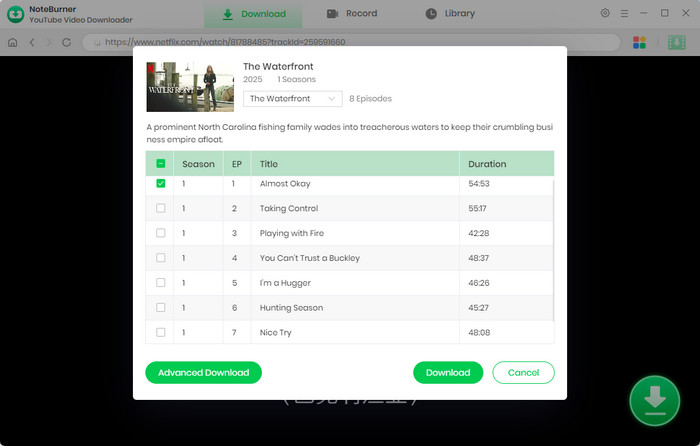
Step 3 Search for the movie or TV show you want, then click the  icon. Choose episodes, adjust subtitles, audio tracks, and video quality in Advanced Download, then click Download to start.
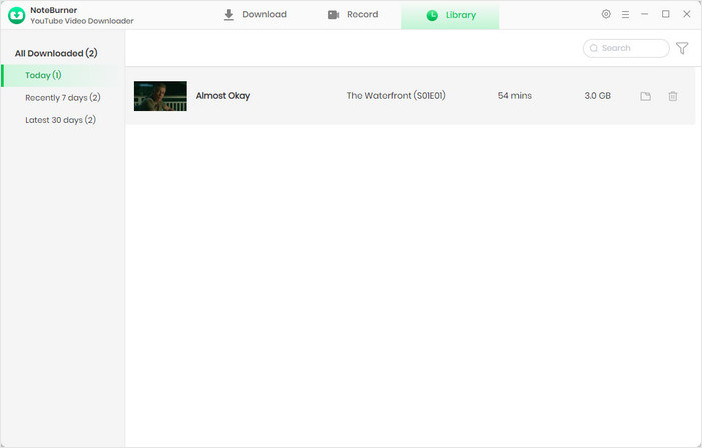
Step 4 Go to Library to view all downloaded videos. You can play them directly or click the Folder icon to open the saved location.
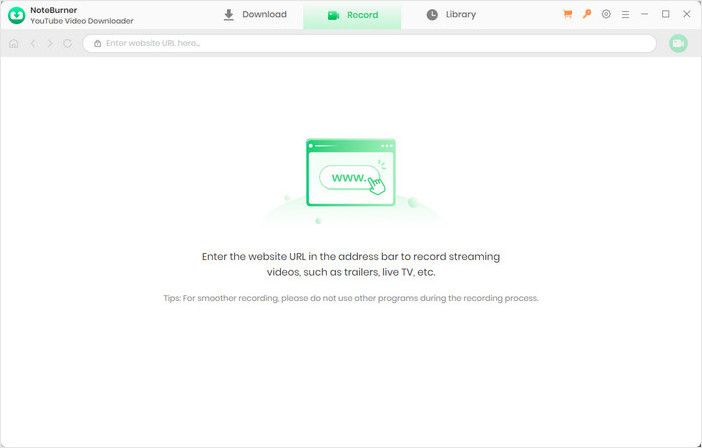
Step 1 Click Record from the top menu to enter recording mode. Copy the video page URL and paste it into the search box.
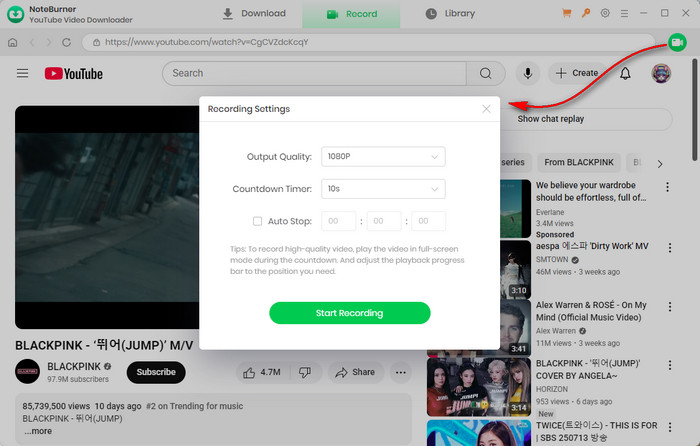
Step 2 Open the target video, then click the Record icon in the upper-right corner. Set the output quality (up to 1080p), recording speed (up to 8X), and auto-stop time.
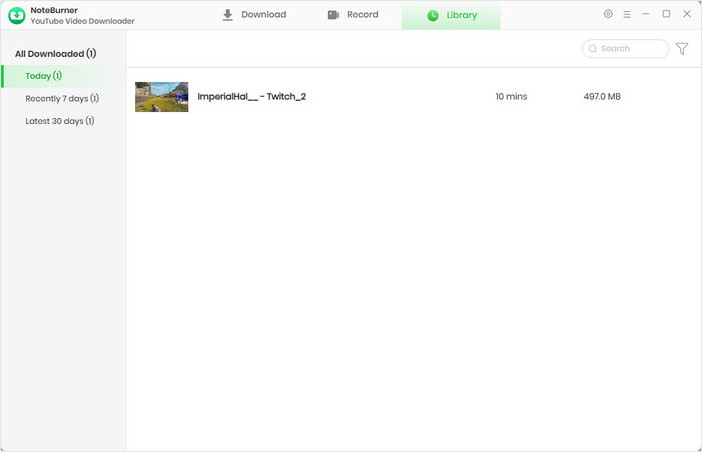
Step 3 Click Start Recording to begin. Once finished, the recorded video will be saved automatically in Library, where you can view and manage it anytime.
Disclaimer: For personal/educational use only. 🚫 Do not distribute downloaded music/video for commercial use.
| Supported Platforms | System | Mode | Video Quality | Audio & Subtitles | Additional Features |
|---|---|---|---|---|---|
| YouTube, Vimeo, Youku, and 1000+ video sites | Windows / Mac / Linux | CLI Download |
Up to Original Quality |
Multi-language Support |
1. Skip YouTube ads (SponsorBlock) 2. Advanced download control |
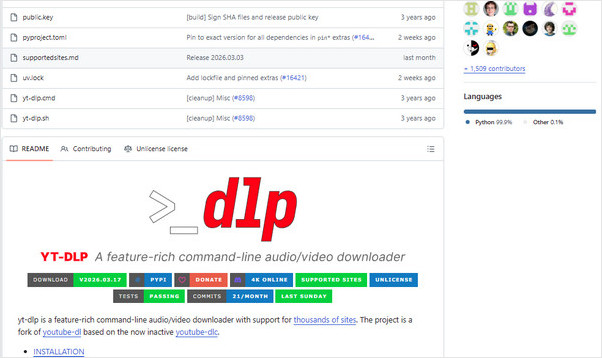
yt-dlp is a free and open-source command-line video downloader designed for users who want full control over video downloading. It works on Windows, Mac, and Linux, and supports platforms like YouTube, Vimeo, and many other video sites.
It is known for its powerful flexibility, allowing users to download videos, audio, playlists, and subtitles. You can also choose formats (MP4, WebM, or FLV...), resolution, and even apply advanced options like proxy settings, retry rules, and post-processing. It also supports SponsorBlock integration to automatically skip sponsored segments in YouTube videos.
Want free movie streaming apps? Here are 10+ safe, legal, and tested apps to watch movies and TV shows in 2026—each with its own unique features.
| Supported Platforms | System | Mode | Video Quality | Audio & Subtitles | Additional Features |
|---|---|---|---|---|---|
|
1000+ Popular Sites + 2000+ Niche Sites |
Windows / Mac | Download + Record + Edit |
Up to 8K AI Upscaling to 4K/8K |
Download Audio & Subtitles |
1. AI Video Enhancement 2. Built-in Editor |
VideoProc Converter AI is an all-in-one streaming video downloader, editor, and AI video enhancer designed for users who need more than just downloading. It supports videos, music, subtitles, and live streams from over 1000+ popular websites and 2000+ niche sites, making it a strong choice for content creators and video editors.
The key strength of this tool lies in its all-in-one capabilities—downloading, editing, and AI enhancement combined in a single program. You can download videos in batches, save playlists and channels, convert files to MP4, MP3, AAC, and more, then directly edit, stabilize, or upscale low-quality videos to 4K or even 8K using AI tools. With GPU hardware acceleration, the whole process is much faster and smoother.
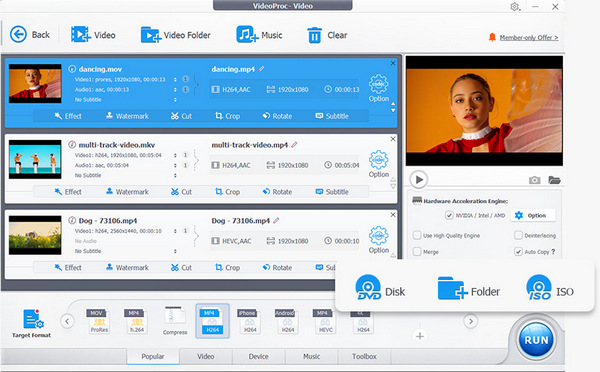
It also includes powerful screen recording features, allowing users to record screen, webcam, system audio, and voice in HD or 4K. Features like picture-in-picture, green screen, and real-time highlighting make it especially useful for YouTubers, vloggers, and tutorial creators.
| Supported Platforms | System | Mode | Video Quality | Audio & Subtitles | Additional Features |
|---|---|---|---|---|---|
|
1700+ platforms YouTube, TikTok, Instagram, Facebook, Twitch, and more |
Android | Video Download + Audio Extract | Up to Original Quality |
1. Subtitle Embedding 2. Thumbnail Saving |
Playlist Download |
Seal is one of the best open-source Android video downloaders in 2026, especially for users who want to save videos directly to their phone gallery. Built on the powerful yt-dlp core, it supports downloading videos and audio from over 1700+ streaming platforms, including YouTube, TikTok, Instagram, Facebook, and Twitch.
The combination of powerful downloading features and a clean mobile experience sets it apart as a standout tool. Unlike many Android download apps filled with ads, Seal offers a smooth, ad-free interface with full Material You design. Users can download videos in maximum quality, save playlists with one tap, extract audio as MP3, and even embed subtitles or thumbnails into downloaded files.
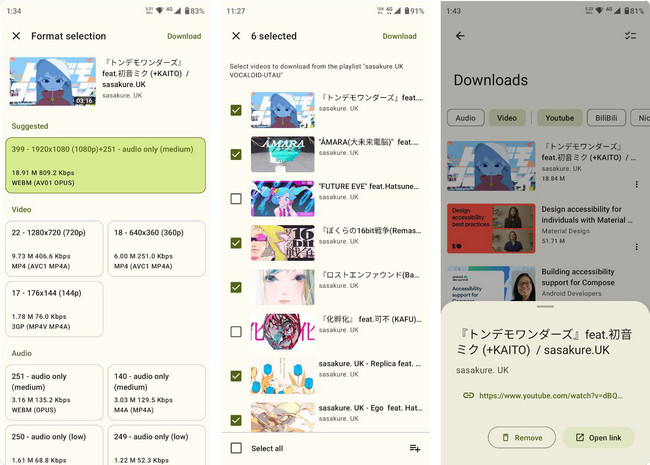
Seal also provides advanced controls like custom yt-dlp commands, region bypass options, and flexible file settings for users who want more control. It is perfect for Android users who want a lightweight but powerful downloader without paying for premium apps.
Explore 10+ top MP4 movie downloaders to save movies free. Compare safe, high-speed tools for downloading movies in MP4 on desktop, mobile, and online.
| Supported Platforms | System | Mode | Video Quality | Audio & Subtitles | Additional Features |
|---|---|---|---|---|---|
| YouTube, Vimeo, TikTok, Facebook, Twitch, SoundCloud, Bilibili, and more | Windows / Mac / Linux | Download + Auto Download |
Up to 8K UHD 4K / 1080P / 720P supported |
Multi-language Audio &
Subtitle |
1. Built-in Browser 2. Smart Mode (auto settings) 3. Playlist & Channel Download 4. Android App Support |
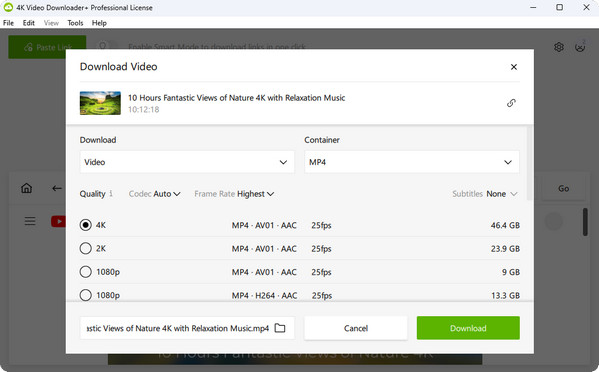
4K Video Downloader Plus is a powerful and easy-to-use streaming video downloader that supports saving videos from major platforms like YouTube, Vimeo, TikTok, Facebook, Twitch, SoundCloud, and Bilibili with support for video and audio output formats like MP4, MKV, MP3, M4A, and OGG.
It allows users to download videos in up to 8K UHD, along with playlists, channels, YouTube Shorts, gaming content, and even YouTube Premium videos. It also supports multiple audio tracks and subtitles, making it ideal for multilingual content.
One of its key strengths is the Smart Mode, which lets users set download preferences once and automatically apply them to future downloads. It also includes a built-in browser for accessing and downloading private or login-protected content directly inside the app.
| Supported Platforms | System | Mode | Video Quality | Audio & Subtitles | Additional Features |
|---|---|---|---|---|---|
| YouTube, TikTok, Instagram, Facebook, Twitter | Windows / macOS / Android / iOS | Online Download | HD / Full HD | High-Quality Audio | / |
VtoSave is a free, web-based video downloader that allows users to download videos from popular platforms like YouTube, Instagram, Facebook, TikTok, and more without the need for software installation. Whether you’re using Windows, macOS, Android, or iOS, VtoSave works seamlessly across all devices and browsers, offering a hassle-free experience.
The platform offers high-quality downloads in resolutions like HD and Full HD, while also maintaining excellent audio quality. With optimized servers, VtoSave ensures fast processing speeds, making it suitable even for downloading longer videos. Moreover, you don’t need to create an account or worry about watermarks on your downloads, making it an excellent choice for users seeking a simple, privacy-focused solution.
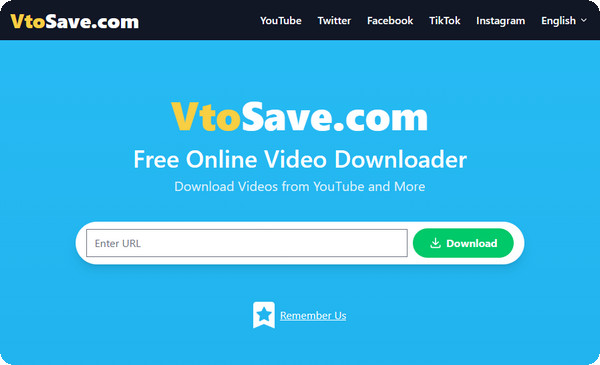
VtoSave provides an intuitive, user-friendly interface that’s designed for both beginners and advanced users. It’s a great tool for anyone looking for a quick and efficient way to download videos without any extra steps.
Looking for free movie websites that actually work? This guide covers 15 most visited free movie streaming sites, with clear pros, cons, and viewing tips.
| Supported Platforms | System | Mode | Video Quality | Audio & Subtitles | Additional Features |
|---|---|---|---|---|---|
| Streams played on any platform | Windows / Mac | Screen Recording | HD, Full HD, 4K | Adjustable Audio Quality |
1. Auto-Recording 2. Built-in Editor 3. Share to YouTube/Google Drive |
Movavi Screen Recorder is a versatile screen recording tool available on both Windows and Mac that allows you to capture streaming videos from any platform that permits screen recording. Whether it’s a live stream, a movie, or a tutorial, Movavi lets you record in HD, Full HD, and 4K resolutions for top-notch quality.
Movavi Screen Recorder stands out for its auto-recording feature, allowing you to schedule recordings even when you're away from your computer. Simply set the parameters (such as title, date, and time), and Movavi will take care of the rest. You can also tweak the video quality, frame rate, and audio quality for the perfect recording. Afterward, you can edit your footage with Movavi’s basic built-in editor and save it in multiple formats like MP4, MP3, MKV, MOV, or AVI.
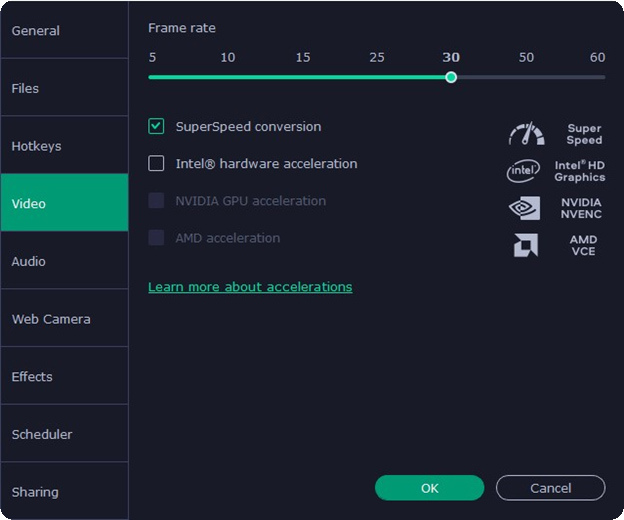
Movavi Screen Recorder is a reliable solution for downloading and saving content from streaming platforms like Netflix, Hulu, and Prime Video, which might otherwise be difficult to capture due to DRM restrictions. However, it requires you to let the video play in real-time, so it’s not a quick fix for long videos like movies or series.
| Supported Platforms | System | Mode | Video Quality | Audio & Subtitles | Additional Features |
|---|---|---|---|---|---|
| Web videos, Streaming sites (browser-based) | Windows Only | Multi-thread Download | Up to Original Quality | Limited Subtitle Support |
1. Browser Integration 2. Batch Download |
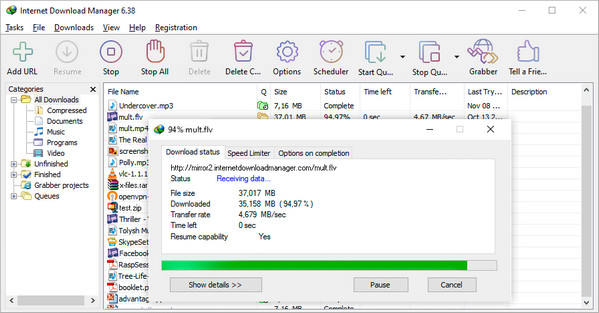
Internet Download Manager (IDM) is a classic Windows-based download accelerator widely used for fast and stable file downloading. It is especially popular for downloading large files, streaming videos, and improving browser download speed with its advanced multi-thread technology.
Although IDM is an older tool, it is still trusted by many users for its stability and performance. It integrates directly with browsers like Chrome and Edge, allowing users to capture and download videos from many streaming websites with just one click. It also supports pause/resume functionality, making it reliable even on unstable networks.
Looking for a reliable YouTube downloader to download HD videos? This detailed article summarizes and analyzes the ten best YouTube video downloaders for you!
A: Most streaming video downloaders cannot directly download content from platforms like Netflix, Disney+, or Amazon Prime because of DRM encryption. However, some advanced tools such as NoteBurner or screen recording methods, can help save this content for offline viewing.
A: Download Mode directly extracts video from the source, offering faster speed and stable quality. Record Mode captures the video as it plays on your screen, allowing you to save almost any content, but it usually takes more time compared to direct downloading.
A: Yes, most advanced video downloaders support multi-language subtitle downloads and separate audio extraction. For example, tools like NoteBurner can even convert video content into MP3 audio files for easier offline listening.
Disclaimer: Laws vary by country. Always check your local copyright laws and platform terms of service before using any downloading tool.
Discover 3 real ways to get Netflix for free or at a lower cost in 2026. Learn what still works and legal ways to access it.
This guide introduces the best streaming video downloaders in 2026, covering different tool types based on platform compatibility, supported streaming websites, and user experience levels.
From simple online downloaders to powerful desktop software, mobile applications, and advanced screen recording solutions, this article covers almost all common needs for downloading streaming videos in HD and even 8K quality. Hopefully, this comparison will help you clearly understand the advantages and limitations of each tool, allowing you to choose the most suitable video downloader for offline viewing.
Note: Only the first 5 minutes of each video can be downloaded with the trial version. Please purchase a full license to unlock unlimited downloads. We recommend testing the trial version before making a purchase.