If you want to download Yellowstone Seasons 1–5 for offline viewing, the official download options come with several restrictions. For example, downloads may expire when your subscription ends, be subject to download limits, or only be available for viewing within the streaming app. If you want to save Yellowstone episodes on your computer and watch them more flexibly, you'll need another approach. This guide covers where to watch Yellowstone Seasons 1–5 and how to download Yellowstone episodes in up to 1080p for offline viewing, with options to save them as MP4 or MKV files.
You can watch Yellowstone Seasons 1–5 on several streaming services, including Peacock, fuboTV, Philo, and YouTube TV. The complete series is also available to buy digitally from Amazon Video and Fandango At Home. Just note that availability can vary by location.
| Platform | Access | Video Quality | Offline Download | Limitation |
|---|---|---|---|---|
| Peacock | Subscription | Up to 4K UHD | ✅ | Premium Plus required; app-only on supported mobile and tablet devices; downloads can expire |
| fuboTV | Live TV subscription | Up to 1080p | ❌ | Cloud DVR is available, but recordings are not standalone video files |
| Philo | Subscription | Up to 1080p | ❌ | Cloud DVR is available, but there is no dedicated offline-download option |
| YouTube TV | Live TV subscription | Up to 1080p; 4K for eligible content | ✅ | 4K Plus required; downloads are limited to supported mobile devices and recorded content |
| Amazon Video | Buy episodes or seasons | HD / UHD | ✅ | Purchase required; downloads are tied to supported apps and devices |
| Fandango At Home | Buy episodes or seasons | HD / 4K UHD | ✅ | Purchase required; playback is limited to supported apps and devices |
Video quality and download availability may vary by title, plan, device, and region.
You generally need an active subscription or a separate purchase to watch Yellowstone on these platforms. Once you have access, you can stream the show through the platform's supported app or website.
As for downloading, some platforms do offer an official download option, including Peacock, YouTube TV, Amazon Video, and Fandango At Home. However, there are a few limitations to keep in mind:
If these limitations don't fit the way you want to watch Yellowstone, keep reading. In the next section, we'll show you step by step how to download Yellowstone episodes to your computer as MP4 or MKV files for more flexible offline viewing.

Want free movie streaming apps? Here are 10+ safe, legal, and tested apps to watch movies and TV shows in 2026—each with its own unique features. Learn More →
Official downloads are convenient for offline viewing, but they are usually tied to the streaming service, supported devices, or the original app. For a more flexible way to save Yellowstone episodes on your computer, NoteBurner All-In-One Video Downloader provides another option.
Compatible with 1,000+ streaming websites, NoteBurner allows you to download Yellowstone episodes to your Windows PC or Mac in MP4 or MKV format, with video quality up to 1080p. It can also preserve multiple audio tracks and subtitles, making it easy to watch Yellowstone offline on your computer or transfer episodes to phones, tablets, USB drives, SD cards, TVs, and other compatible devices.

Step 1 Launch NoteBurner and Select a Streaming Service
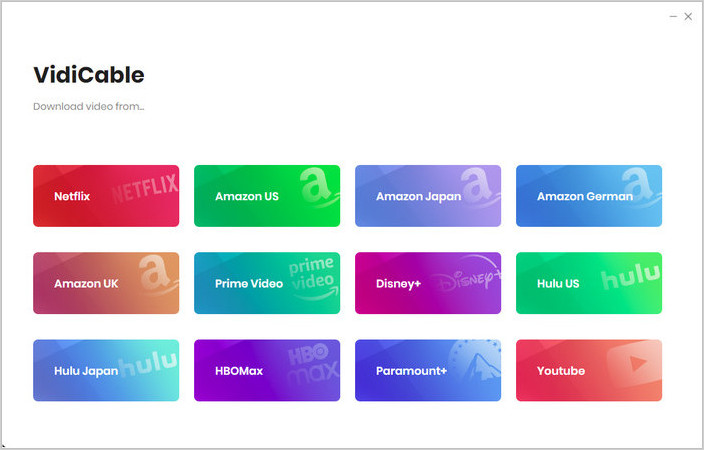
Open NoteBurner All-In-One Video Downloader and select the streaming service where you want to find Yellowstone, such as Peacock or Amazon Video. The built-in browser will open the selected platform's official website.
Click More Sites to browse 1,000+ supported websites, sorted by name or category.
Step 2 Choose MP4/MKV and 1080p Settings
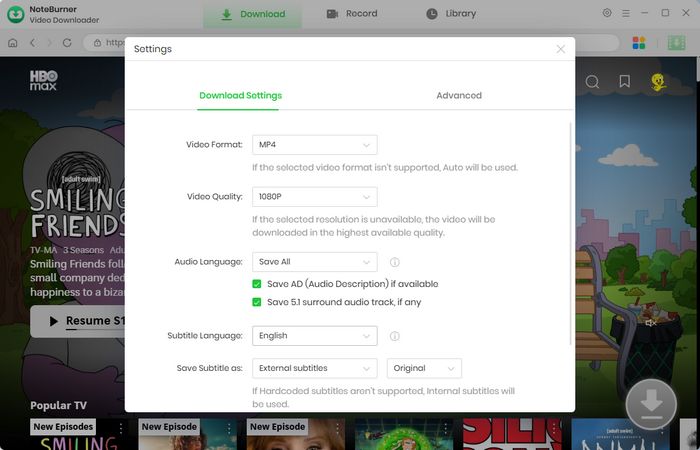
Click the  button in the upper-right corner to customize the video quality, output format (MP4 or MKV), and output folder.
Step 3 Find Yellowstone Seasons 1–5
Enter Yellowstone in the search box or browse directly through the streaming platform to locate the seasons or episodes you want to download.
Step 4 Select Audio Tracks and Subtitles
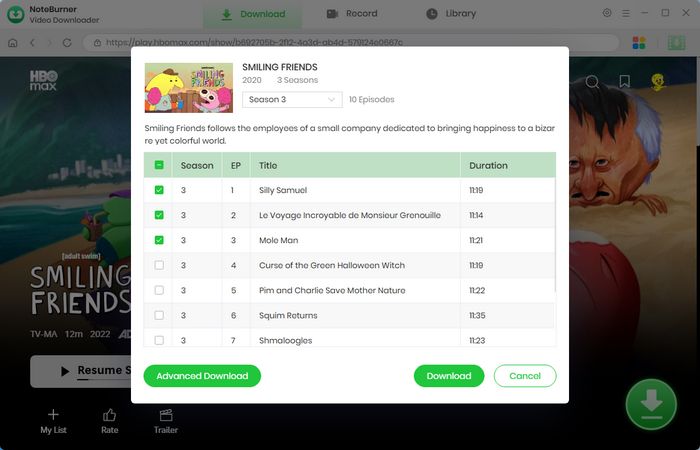
Click Advanced Download to choose the video quality, audio tracks, subtitle language, and subtitle type before downloading.
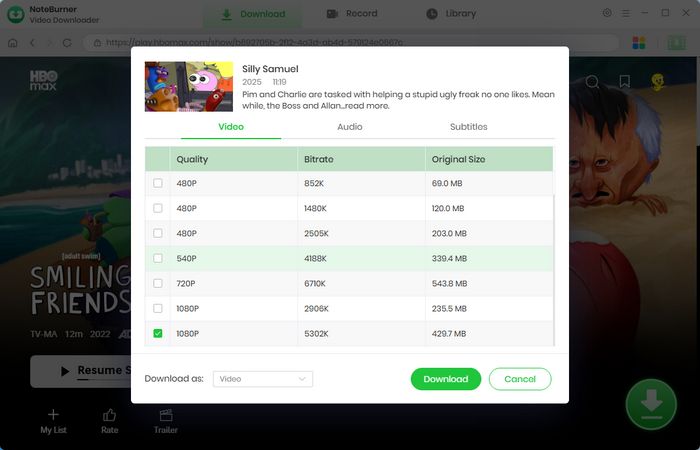
Step 5 Download Yellowstone Episodes
Click the Download button to start downloading Yellowstone episodes to your computer.
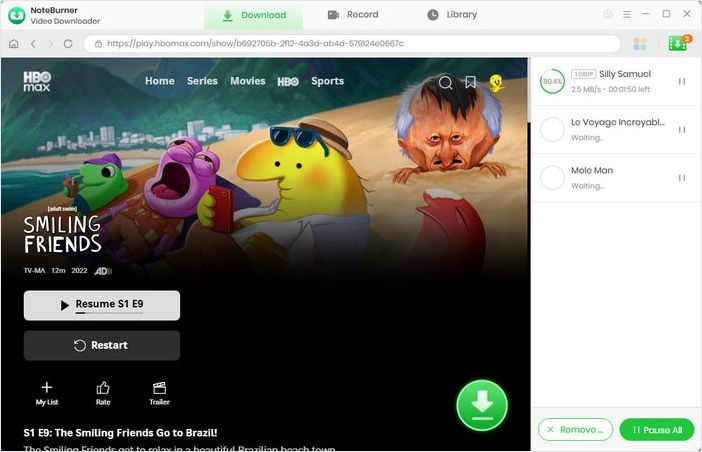
Step 6 Find and Watch the Downloads
Open the Library to view all downloaded videos. You can now watch Yellowstone offline on your computer or transfer the MP4/MKV files to an iPhone, Android phone, tablet, USB drive, SD card, TV, media player, and more.
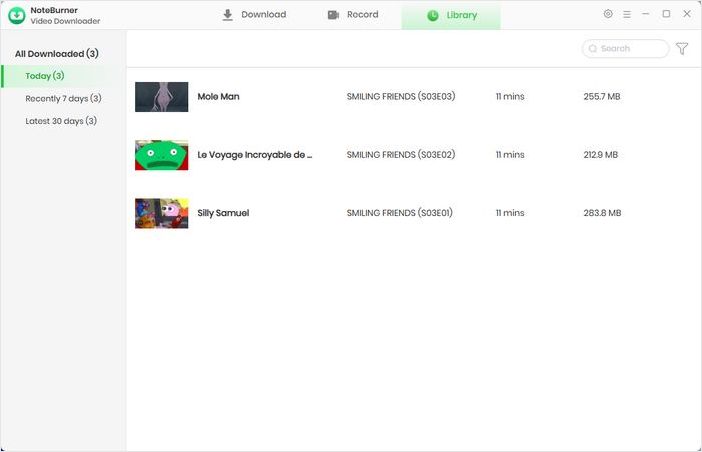
Disclaimer: For personal/educational use only. 🚫 Do not distribute downloaded video for commercial use.

Looking for free movie websites that actually work? This guide covers 15 most visited free movie streaming sites, with clear pros, cons, and viewing tips. Learn More →
Several official streaming platforms allow you to download Yellowstone for offline viewing within their supported apps, subject to their plan and device restrictions. For more flexible offline playback, you can also use NoteBurner All-In-One Video Downloader to save supported Yellowstone episodes as MP4 or MKV files on your computer.
Most streaming services require a paid subscription or direct purchase to access Yellowstone and its available HD or 1080p downloads. Some free online sites may also offer Yellowstone episodes, but ads, pop-ups, and redirects can make them less convenient and require extra caution.
Although Yellowstone is produced by Paramount Network, the series has been available to stream on Peacock rather than Paramount+. Peacock currently offers all five seasons of Yellowstone, while Paramount+ is home to related series such as 1883 and 1923.
Official streaming downloads are generally protected and tied to the service's app, so they cannot be transferred to a USB drive as ordinary video files. To transfer Yellowstone episodes more freely, you need a downloadable video file such as MP4 or MKV. NoteBurner can save supported videos in these formats, which you can then move to a USB drive.
Yes. Official streaming services may provide multiple subtitle or audio-language options, depending on the title and region. NoteBurner also lets you select available audio tracks and subtitles before downloading. Subtitles can be saved as external SRT or VTT files, kept as internal subtitles in the video, or hardcoded directly into the video. Internal subtitles can retain multiple languages for selection during playback on compatible players, while hardcoded subtitles permanently display one selected language.

This article lists over 10 tested, stable, and safe free anime websites, where you can watch the latest anime episodes online in HD easily. Learn More →
This guide covered where to watch Yellowstone Seasons 1–5 and the available options for downloading episodes for offline viewing. While platforms such as Peacock, YouTube TV, Amazon Video, and Fandango At Home offer official download options, these downloads are generally tied to specific apps, devices, subscription plans, or purchase platforms.
For a more flexible way to save Yellowstone episodes on your computer, NoteBurner All-In-One Video Downloader lets you download supported episodes in up to 1080p and save them as MP4 or MKV files. You can also keep available audio tracks and subtitles and batch download multiple episodes for offline viewing.
Ready to watch Yellowstone Seasons 1–5 offline on your own devices? Try NoteBurner All-In-One Video Downloader and save your favorite episodes for more flexible offline playback.
Note: Only the first 5 minutes of each video can be downloaded with the trial version. Please purchase a license to access full downloads. We recommend testing the trial version before making a purchase.