Want to download movies on Netflix for offline viewing? The steps depend on your device. You can download movies through the Netflix app on iPhones, iPads, Android devices, Fire tablets, and supported Chromebooks. But what if you're using a Windows laptop or MacBook, where Netflix doesn't offer downloads? This guide shows you how to download Netflix movies on any device, from the official app to alternative tools like NoteBurner.
| Device | Netflix App Download | Download Options |
|---|---|---|
| iPhone / iPad | Yes |
Netflix App (offline viewing) NoteBurner (MP4/MKV files, transferable from PC/Mac) |
| Android / Fire Tablet | Yes |
Netflix App (offline viewing) NoteBurner (MP4/MKV files, transferable from PC/Mac) |
| Chromebook (Google Play) | Yes |
Netflix App (offline viewing) NoteBurner (MP4/MKV files, transferred from PC/Mac) |
| Windows PC / Laptop | No | NoteBurner (MP4/MKV downloads) |
| Mac / MacBook | No | NoteBurner (MP4/MKV downloads) |
Tip: Netflix app downloads can expire and only play within the app. If you want MP4/MKV files for offline playback on different devices without Netflix's in-app expiration limits, use NoteBurner Netflix Video Downloader on a Windows PC or Mac, then transfer the files to your device.
You can download Netflix movies on iPhone, iPad, Android phones and tablets, and Amazon Fire tablets using the Netflix app. The steps are nearly identical across these devices.
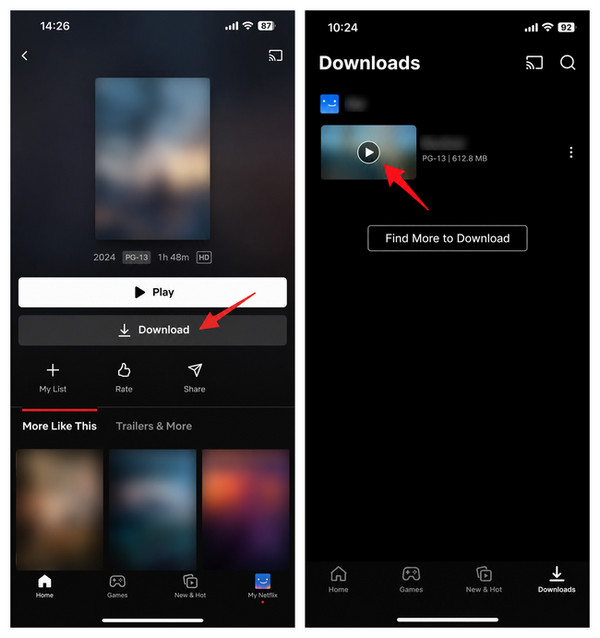
Step 1 Open the Netflix app on your device and sign in to your account.
Step 2 Search for the movie you want to download and open its details page.
Step 3 Tap the Download button. Wait for it to finish, preferably while connected to Wi-Fi.
Step 4 Open Downloads in the Netflix app, find your movie, and tap Play to watch it offline.
Quick Tips:
Note: Not every Netflix title can be downloaded, and downloads don't last forever. Some expire within 48 hours after you start watching, so check their expiration dates and make sure you have enough time to finish your movies!

This article explores popular free Netflix video downloaders, revealing which ones actually work and the limitations behind these so-called free tools. Learn More →
Unlike phones and tablets, Windows PCs and Macs no longer support official Netflix downloads. The Windows Netflix app has removed its download feature, and Netflix doesn't offer offline downloads through web browsers or on macOS. So, if you're looking for a Download button on your laptop, you won't find one.
But you can still save Netflix movies for offline viewing on your computer using NoteBurner Netflix Video Downloader.
NoteBurner Netflix Video Downloader lets you download Netflix movies and TV shows as local MP4 or MKV files on Windows and Mac. It supports up to 1080p resolution, multiple audio tracks and subtitles, and batch downloads of entire TV seasons. Unlike Netflix app downloads, the saved files aren't tied to the app's expiration dates and can be transferred to compatible devices for offline playback.

Here's how to download Netflix movies on your laptop in four steps:
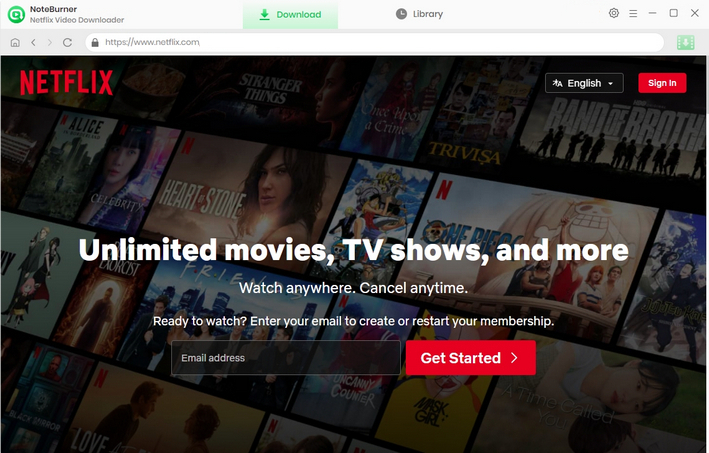
Step 1 Install NoteBurner and sign in to Netflix. Download NoteBurner for Windows or Mac, launch it, and sign in to your Netflix account through the built-in browser.
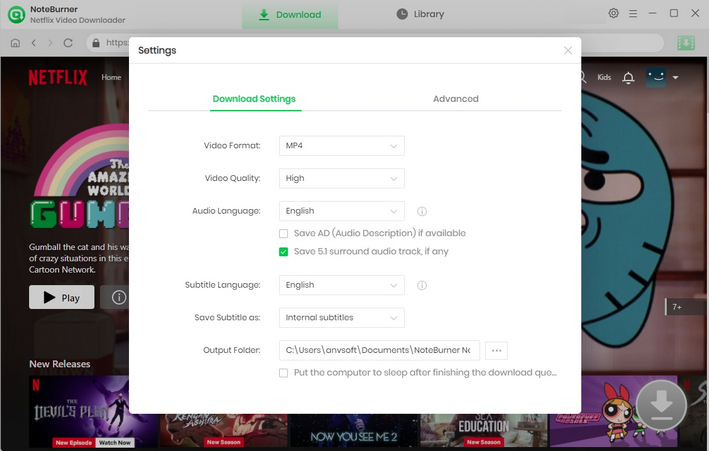
Step 2 Choose your download settings. Click the Settings icon to select MP4 or MKV, video codec, video quality (240p-1080p), output folder and more.
Step 3 Find a movie and start downloading. Search for a Netflix title or paste its URL, then click the Download icon. Select your preferred audio tracks and subtitles in the pop-up window, and click Download again to start downloading.
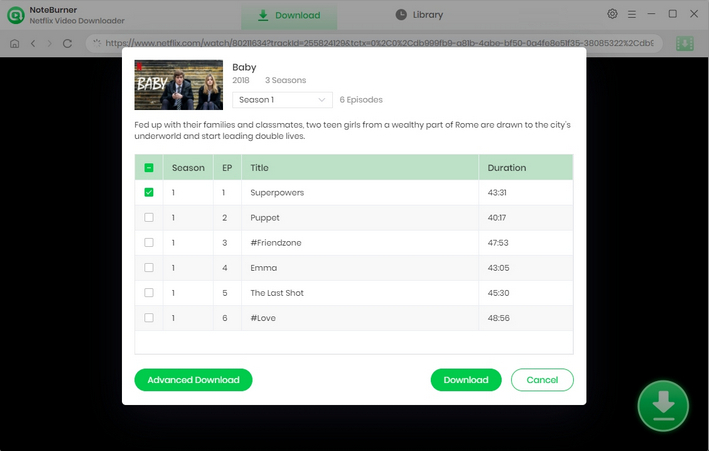
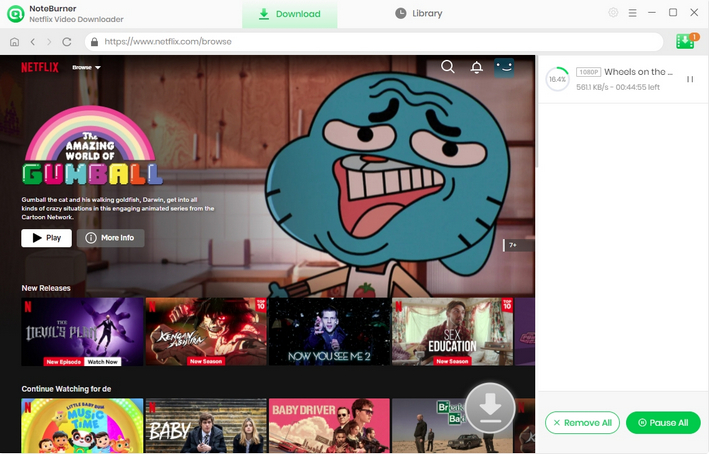
Step 4 Find your downloaded Netflix movies. Once the download finishes, open the Library tab to locate your saved videos. You can play them offline on your computer or transfer them to other compatible devices.
Disclaimer: Download content only when you have the necessary rights or permission. Respect Netflix's terms and applicable copyright laws. Do not redistribute copyrighted videos.
If you can't download a movie, your downloads have disappeared, or a video won't play offline, check the common issues and fixes below.
| Issue / Limit | Why It Happens | What to Do |
|---|---|---|
| No Download button | Not every Netflix movie or TV show is available for download. | Look for another downloadable title or check its availability. |
| Download expired | Downloads expire after a set period. Some expire 48 hours after you start watching. | Check the expiration date in Downloads and renew the title if allowed. |
| Download limit reached | Ad-free plans allow up to 100 active downloads per device. Ad-supported plans are limited to 15 downloads per device per calendar month. | Delete watched titles to free up space on ad-free plans. On ad-supported plans, wait for the monthly limit to reset if you've used all 15 downloads. |
| Can't play downloads offline | Downloads only work in the Netflix app on the device where they were saved. | Stay signed in, use the same device, and make sure the download hasn't expired. |
| Download fails or gets stuck | Weak Wi-Fi, insufficient storage, or an outdated app may interrupt downloads. | Check your connection and storage, update Netflix, and try downloading again. |
Both methods let you watch Netflix movies offline, but they work differently. The Netflix app is the easiest choice for mobile viewing, while NoteBurner offers more flexibility for downloading and managing videos on a computer.
| Feature | Netflix App | NoteBurner |
|---|---|---|
| Supported Devices | iPhone, iPad, Android, Fire Tablet, supported Chromebook | Windows PC, Mac |
| File Format | In-app downloads | MP4, MKV |
| Offline Playback | Netflix app only | Compatible video players |
| Download Expiration | Downloads expire | No Netflix app expiration timer on saved files |
| Transfer to USB / TV | No direct file export | Yes, on compatible devices |
| Video Quality | Depends on device and title | Up to 1080p |
| Batch Downloads | Individual titles or entire TV seasons | Multiple episodes and seasons |
| Netflix Account Required | Yes | Yes, to access and download titles |
| Cost | Included with an eligible Netflix subscription | Separate software license; free trial available |
Which should you choose? If you're watching on a phone or tablet, start with the Netflix app's built-in download feature at no extra cost. If you need to download Netflix movies on Windows or Mac, or prefer MP4/MKV files for offline playback across compatible devices, try NoteBurner Netflix Video Downloader.
Not directly. Netflix no longer supports downloads on Windows PCs or Macs, including the Windows app and web browsers. To save movies for offline viewing on a laptop, you can use other tools like NoteBurner Netflix Video Downloader.
The Download button may be missing because your device doesn't support Netflix downloads, the title isn't available for offline viewing, or your app needs updating. Download limits can also prevent new downloads. Check your device compatibility, update the Netflix app, and try another title.
No. Official Netflix downloads expire after a certain period, and some must be finished within 48 hours after you start watching. However, videos saved as local MP4 or MKV files using tools like NoteBurner aren't subject to Netflix's in-app download expiration timer.
Now you know how to download movies on Netflix across different devices. Whether you're using an iPhone, Android, tablet, Chromebook, Windows PC, or Mac, this guide helps you find the right method for offline viewing. For supported mobile devices, the Netflix app is the easiest option. If you need MP4/MKV files or want to download Netflix movies on a laptop, NoteBurner is another option worth considering. Choose what works best for your device and viewing needs!
Note: Only the first 5 minutes of each video can be downloaded with the trial version. Please purchase a license to enjoy the full video. It is suggested that to download the trial version and have a test before purchasing it.