Rumble has grown into a video-sharing platform with a global user base. It is reported that it had an average of 57 million monthly active users worldwide in Q2 2026, reflecting the platform's continued reach. Its content ranges from independent news programs and podcasts to hunting channels, product reviews, and full-length documentaries.
But is it possible to download individual video files for offline viewing? The answer is yes. A Rumble video downloader can help. This guide explores four effective ways to download Rumble videos and compares free and desktop options to help you find the one that's right for you.
| If you want to | Use this | Why it fits |
|---|---|---|
| Watch offline in the mobile app | Rumble app with Premium | Official, one tap, no files to manage |
| Keep permanent MP4 files on a PC or Mac | NoteBurner All-In-One Video Downloader | Supports recording compatible videos at up to 8× speed and 1080p resolution |
| Grab one video without installing anything | An online downloader | Fastest for a single link |
| Download while browsing on desktop | A browser extension | One-click button beside the player |
Want to keep Rumble videos as local files? Try NoteBurner All-In-One Video Downloader and test whether it supports your video link.
It depends on the video, your permissions, and how you want to use it later. On Rumble, you can get official offline viewing via Premium, but if you’re thinking about saving separate video files, there’s more to consider. Here are like three main things to keep in mind.
Copyright belongs to the rights holder. Downloading a video does not give you ownership of it. Reposting, redistributing, or monetizing someone else's video without permission may infringe copyright.
Check Rumble's terms. Rumble restricts unauthorized copying, redistribution, and commercial use of its content. Premium downloads are designed for offline viewing within the Rumble app, rather than exporting standalone video files.
Choose the right method for your needs. For videos you own or have permission to save, a desktop downloader may be a practical option for keeping local copies. Before reusing someone else's footage, check its license and obtain permission when needed.
A quick rule of thumb:
This is general information and does not constitute legal advice. Rules vary by jurisdiction. For details, see Rumble's Terms of Service.
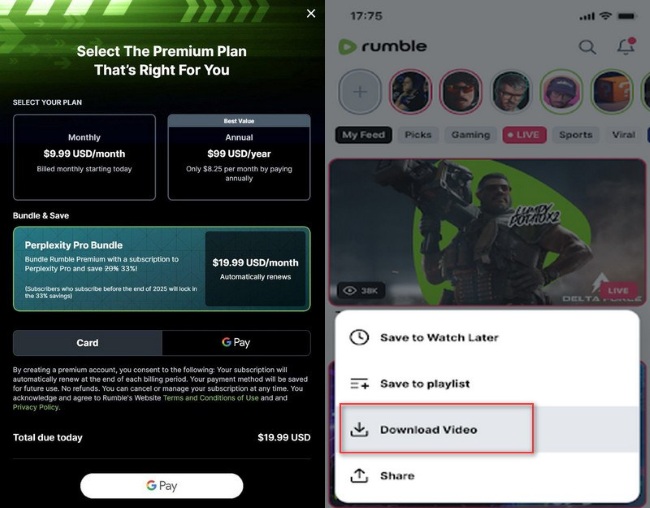
Rumble Premium is the paid subscription service for the Rumble video platform. With Rumble Premium, users can enjoy ad-free viewing and download videos for offline viewing in the Rumble app on iOS and Android.
Step 1Subscribe to Rumble Premium and sign in to the Rumble app on your phone or tablet.
Step 2Open the video you want and tap “Download Video”.
Step 3Find the title in your downloads and play it without a connection.
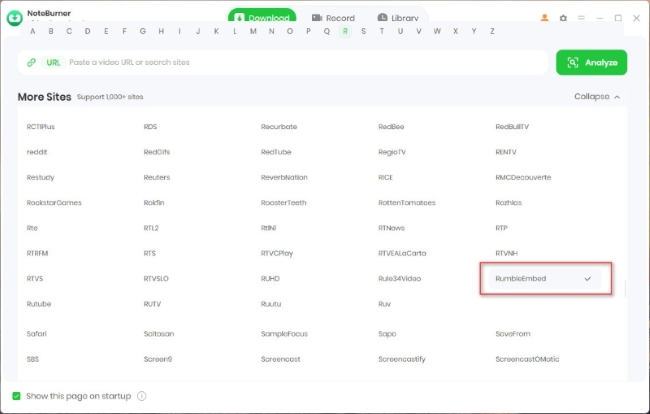
Desktop software is a practical solution for saving Rumble videos as local files in formats such as MP4. NoteBurner All-In-One Video Downloader lists RumbleEmbed among its supported sources, alongside Netflix, Prime Video, Disney+, YouTube, TikTok, and many other platforms. It helps users save Rumble videos for offline viewing and manage their local video libraries.

Step 1 Install and open NoteBurner All-In-One Video Downloader. Click Record in the top menu to enter recording mode. Copy the Rumble video URL and paste it into the search box.
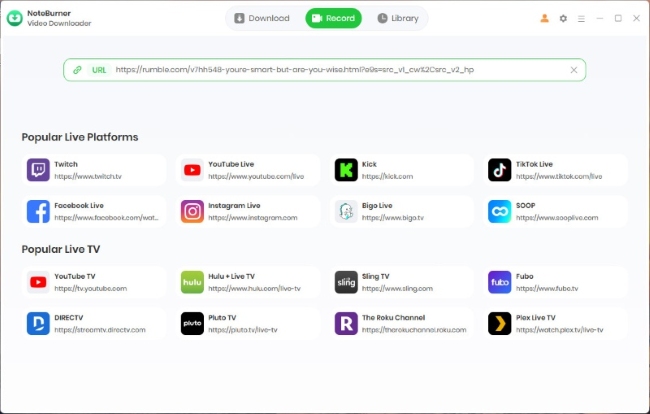
Step 2 Press Enter to open the video, then click Settings in the upper-right corner. Choose your output quality, recording speed, and auto-stop time.
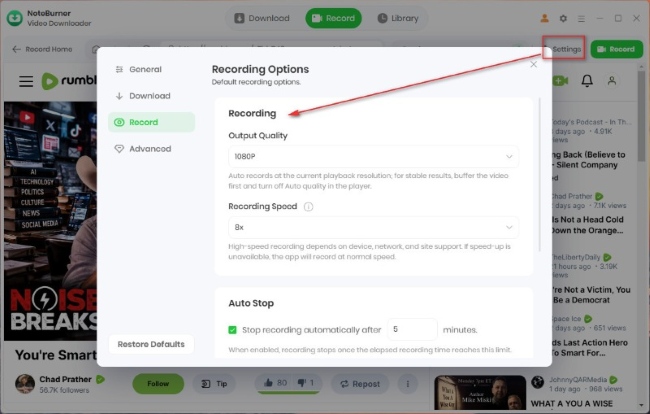
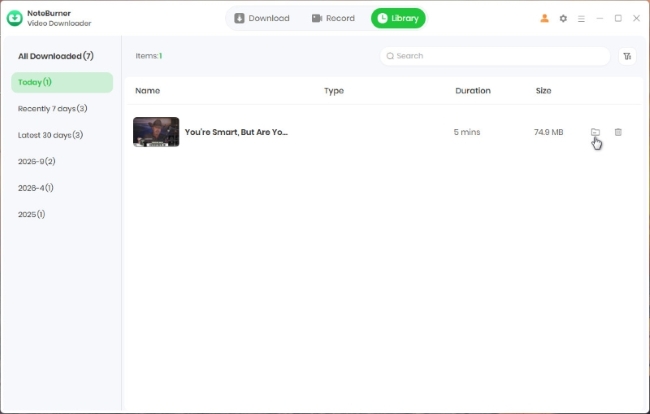
Step 3 Click Record next to Settings to start recording. When finished, the video will be saved to your library, where you can view and manage it.
Disclaimer: For personal/educational use only. 🚫 Do not distribute downloaded music/video for commercial use.
An online Rumble video downloader free tool can be convenient when you only need to save an occasional public video. Most browser-based tools follow a similar process, although their supported URLs and features differ.
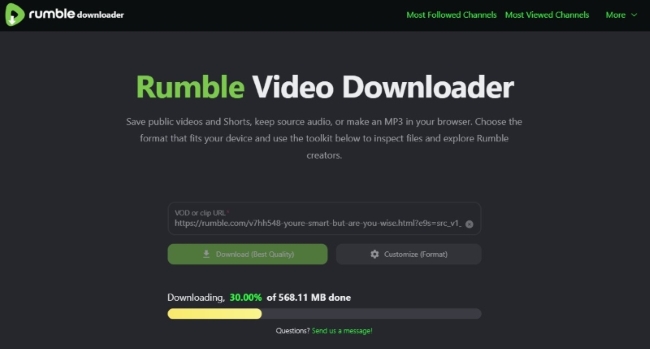
Step 1 Copy the URL of the Rumble video you want to save.
Step 2 Open an online downloader that supports Rumble.
Step 3 Paste the video URL into the input field.
Step 4 If output settings are available, choose your preferred format and resolution.
Step 5 Click Download, save the file, and play it locally to check that it works.
If you frequently save videos while browsing, a browser extension can be a convenient option. Some extensions detect media files on supported pages and provide download controls directly in the browser.

Step 1 Open Google on your computer and search for the Video Downloader Professional extension. Install it and pin its icon to the browser toolbar.
Step 2 Open Rumble and play the video you want to download.
Step 3 Click the extension's green download icon with a red dot to open the available download options.
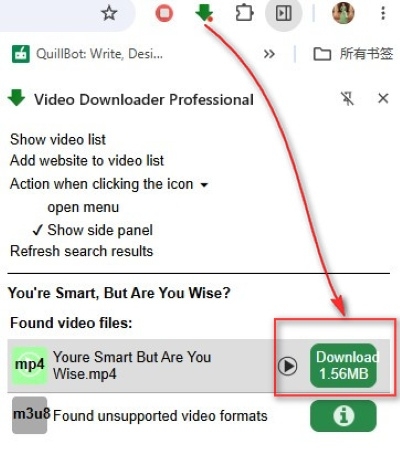
Step 4 Click the corresponding green "Download" button to download the Rumble video.
| Method | Platform | Cost | Output | Batch | Best for |
|---|---|---|---|---|---|
| Rumble Premium | iOS, Android app | Subscription | In-app only | No | Offline viewing on mobile |
| NoteBurner All-In-One | Windows, macOS | Free tier (5 min per video), then license | MP4 or MKV, up to 1080p, subtitles | Yes | A permanent local library |
| Online Rumble Video Downloader | Any browser | Free, ad-supported | Usually MP4, often 720p | No | One video, no install |
| Browser Extension | Desktop Chrome or Edge | Free | MP4, source-dependent | No | Occasional desktop grabs |
⬇️ Key Takeaway: Choose Rumble Premium for official offline viewing in the mobile app, NoteBurner for local video files and batch processing when the tested workflow supports your video, or an online downloader or browser extension for occasional downloads. Check video quality, compatibility, and permissions before choosing a method.
Rumble downloads can fail because the URL is incorrect, the video is unavailable, or the stream cannot be processed. First, check the video URL, make sure it plays normally, and use the complete video link, not a channel page or a search link. If it still doesn't work, the tool may not support that specific video or URL type, so try a different tool. Also, if the content is private, removed, or restricted, a third-party downloader may be unable to retrieve it, even if the link looks correct.
A Rumble video downloader can achieve quality close to that of the original stream, but it cannot produce quality that the site does not offer. When Rumble offers a video at 720p, the tools here support up to 720p quality. Any downloader advertising 4K from a 720p source is overstating its capabilities. Desktop recorders can record at up to 1080p, matching the stream, though free online tools often add more compression. The source video's available resolution on Rumble sets the hard upper limit.
Online tools send files to the browser's default download folder. Desktop software saves files to the output path you select; in NoteBurner, the Library view lists all items, and clicking a folder icon opens that location. Rumble Premium files stay inside the app and are not exportable.
Yes, in three different senses. Online downloaders and browser extensions cost nothing but come with ads, quality caps, and no batch support. Desktop software usually has a free tier, and NoteBurner's free version saves the first five minutes of each video. For full-length files at original quality, a paid license is the realistic option.
If you use free online tools, keep these points in mind. Scan the website with security-scanning software, such as VirusTotal, before downloading anything. Also, use an ad blocker to avoid pop-ups, redirects, and other annoying interruptions. Avoid entering personal information, because a legitimate downloader should never ask for your email, phone number, or credit card details.
If you want a smoother, ad-free, and low-risk experience with original-quality content, it may be better to skip the free online route and use a dedicated desktop application, such as NoteBurner. It's usually safer and more reliable, too.
If you want to find a reliable Netflix video downloader to download HD quality Netflix videos for offline viewing, here we can recommend you to the top 4 Netflix video downloaders. Learn More →
Sometimes you just want to save a Rumble video and watch it later without hunting for the link again. If watching offline in the Rumble app is enough, Premium may do the job. But if you'd rather keep videos as files on your computer and build your own collection, NoteBurner All-In-One Video Downloader is worth a try. The free trial is limited to the first five minutes of each video, so test your Rumble link before purchasing a license.