>
YouTube Tips >
>
YouTube Tips >
KeepVid was once a popular online video downloader for saving videos and music from YouTube and other websites. Although the original service stopped offering downloads in 2018, new websites using the KeepVid name have appeared. So, does KeepVid still work, and is it safe to use?
In this KeepVid review, we'll focus on the currently accessible KeepVid.id website, examine its features, explain how it works, and look at its download performance, potential limitations, and alternatives.
KeepVid was originally a free online video downloader that allowed users to save videos from YouTube, Facebook, Vimeo, and other websites. However, the original KeepVid service discontinued its video and audio downloading features in March 2018.
Today, websites using the KeepVid name can still be found online. One of them is KeepVid.id, which presents itself primarily as a free YouTube video and audio downloader. It advertises MP4 and MP3 downloads, keyword search, and compatibility with desktop and mobile browsers. For the rest of this article, we'll focus on the current KeepVid.id website, examining what it offers and how its downloading features work.
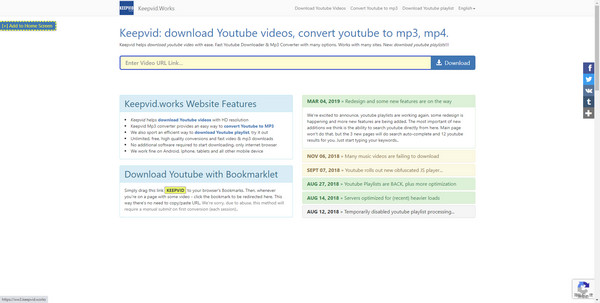
Important: KeepVid.id should not automatically be considered the same service as the original KeepVid, as there is currently no evidence confirming that the site now available is the original service.

Looking for a reliable YouTube downloader to download HD videos? This article summarizes the ten best YouTube video downloaders for you! Learn More →
According to its official website, KeepVid offers a range of free video downloading and conversion features. Let's look at what KeepVid claims to offer and the key features we'll focus on testing.
KeepVid lets you download YouTube videos and convert them to MP3 without installing software. However, the process isn't always straightforward. Here's how it worked in our test.
Step 1 Open KeepVid, paste a YouTube video URL into the search box, and click GO. You may need to close redirected pages before KeepVid displays the video.
Step 2 Once the video is processed, choose an available MP4 resolution or MP3 bitrate, then click Download. Be aware that this may trigger another redirect.
Step 3 For video downloads, KeepVid opens a new page with a video player instead of saving the file directly. Right-click the video or open the player's menu and select Download to save it.
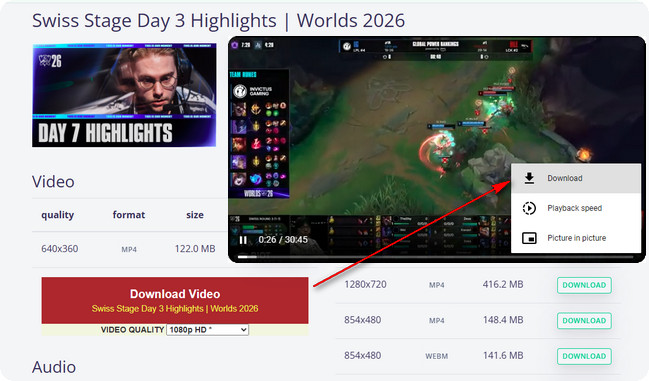
Note: In our tests, redirects and slow loading made the process time-consuming. The actual file transfer was relatively fast once the download started.
For this KeepVid review, we tested 20 YouTube videos and 8 playlists, focusing on download success rates, video quality, MP3 bitrate, ID3 tags, playlist support, and redirects. We also tested downloads from both US and non-US regions to check regional restrictions. Here's what we found.
KeepVid successfully processed only 8 out of 20 tested videos (40%) and 3 out of 8 playlists (37.5%). Some videos worked only after multiple attempts.
Failed requests showed errors such as "not able to find videos" and "Music videos blocked by DMCA in United States". We switched to a non-US location for additional MP3 and metadata testing.

On successfully processed videos, KeepVid offered resolution options up to 4K (2160p). This is useful for saving high-resolution YouTube videos.
However, its download options were fairly basic. We couldn't find dedicated settings for subtitles, audio tracks, or other advanced video options.

Read this guide to get a free 4K video downloader, which will help you download 4K videos from YouTube for free. Learn More →
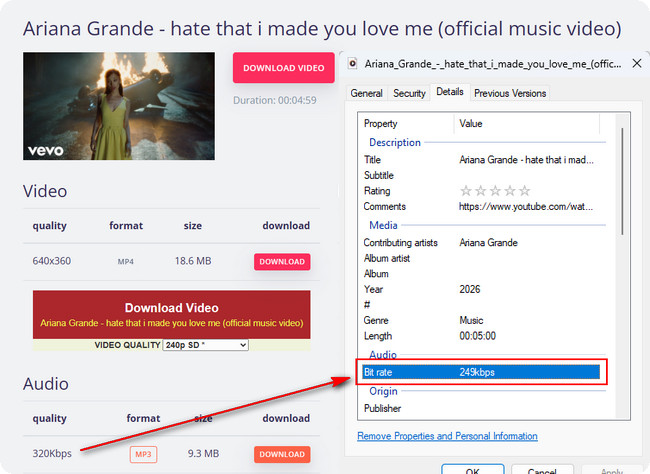
KeepVid offers 320 kbps MP3 downloads, but the selected bitrate didn't always match the saved file. In one test, we selected 320 kbps, while Windows file properties showed an actual bitrate of 249 kbps.
The downloaded MP3 included album artwork, the video title, and the artist name. However, other ID3 metadata fields were not fully populated.
KeepVid could display the videos in some YouTube playlists, including their titles and durations. However, it couldn't download an entire playlist in one batch.
Each video had to be opened in a separate window and downloaded individually, making large playlists time-consuming.
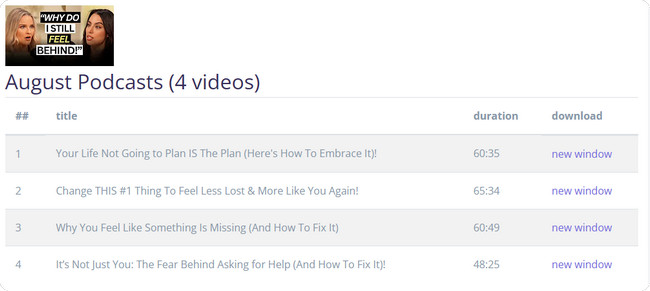
KeepVid frequently opened redirected pages after clicking GO or selecting a download option. We had to close these pages repeatedly to continue.
Video downloads also required an extra step. Instead of saving the file directly, KeepVid opened a new page with a video player. We then had to select Download from the player's menu.
Loading pages and dealing with redirects took considerable time. However, the actual video and audio file transfers were relatively fast once downloads started.
| Test Item | Our Findings |
|---|---|
| Video Parsing | 8/20 successful (40%), including retries |
| Playlist Parsing | 3/8 successful (37.5%) |
| Maximum Video Resolution | Up to 4K (2160p) |
| Subtitles & Audio Options | ❌ No dedicated settings found |
| MP3 Bitrate | 320 kbps selected; 249 kbps in one test |
| MP3 Metadata | Album artwork, title, and artist preserved; other tags incomplete |
| Batch Playlist Downloads | ❌ Not supported in our tests |
| Download Process | Frequent redirects and extra steps |
| File Transfer Speed | Relatively fast once started |
Our Verdict: KeepVid can save YouTube videos in up to 4K and offers MP3 downloads, but its low parsing success rate, limited download settings, lack of batch support, and frequent redirects make it less convenient for regular use.
Based on our hands-on test results, KeepVid's features, and overall user experience, we've summarized its main pros and cons.
Our KeepVid tests revealed several drawbacks, including a low video parsing success rate, frequent redirects, no batch playlist downloads, and limited audio and subtitle settings. If you want a more convenient way to download YouTube videos, NoteBurner YouTube Video Downloader is a free KeepVid alternative worth trying.
NoteBurner supports 4K/8K video downloads, free MP3 downloads at up to 256 kbps, batch playlist downloading, and flexible audio and subtitle settings. Its built-in YouTube browser also makes it easier to download videos without switching between redirected pages.

Both tools offer free YouTube downloads, but they differ in video quality, playlist support, and download options. Here's how KeepVid performed in our tests compared with NoteBurner's features.
| Feature | KeepVid | 🏆 NoteBurner YouTube Video Downloader |
|---|---|---|
| Download Reliability | 39% video parsing success (11/28) | 99.9% success rate |
| Maximum Video Quality | Up to 4K | Up to 8K |
| Video Formats | MP4 | MP4, MKV |
| MP3 Downloads | 320 kbps selected; 249 kbps in one test | Free MP3 downloads up to 256 kbps |
| Audio Formats | MP3 | MP3, M4A, WebM |
| Playlist Downloads | One video at a time | Batch playlist downloads |
| Audio & Subtitle Settings | No dedicated settings found | Available audio and subtitle options |
| Download Process | Frequent redirects and extra steps | Download within the software |
| Installation | Not required | Required |
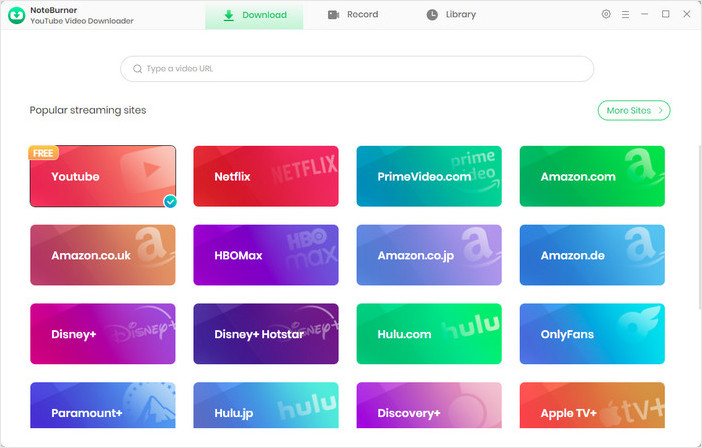
Step 1 Open YouTube in NoteBurner
Launch NoteBurner YouTube Video Downloader and select YouTube to open its built-in browser.
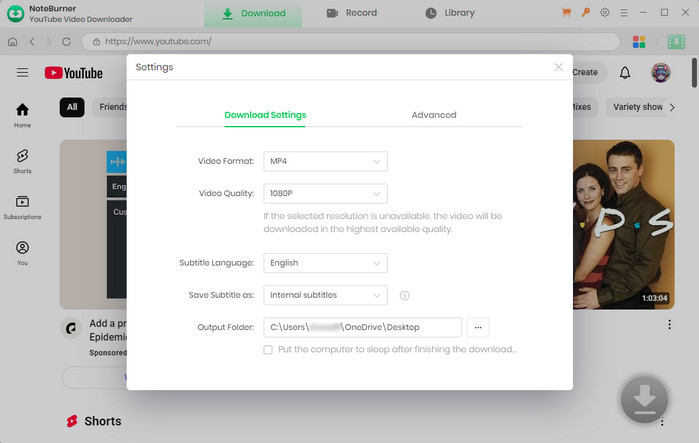
Step 2 Set Download Preferences
Click Settings to choose your video format, quality, and output folder. Video downloads support MP4 or MKV at up to 8K when available.
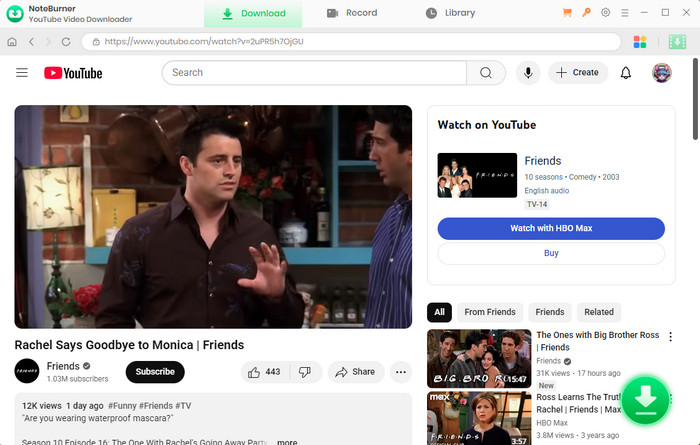
Step 3 Find a Video or Playlist
Search for a YouTube video or playlist using the built-in browser.
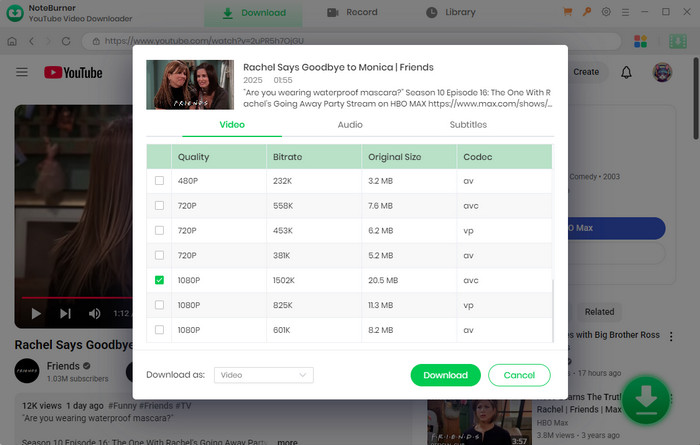
Step 4 Choose Video, MP3, or Subtitle Options
Click the Download icon to choose video quality, audio tracks, and subtitles. To save audio only, select Download as Audio. You can also select Download as Subtitles to save subtitles separately.
Step 5 Download and Find Your Files
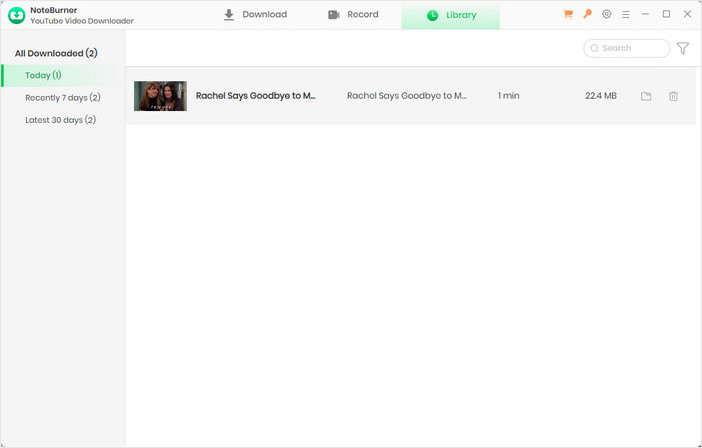
Click Download to save the selected videos or audio files. When finished, open Library to access your downloads.
This article will teach you to download YouTube video to an SD card with NoteBurner YouTube Video Downloader, thus saving your device storage. Learn More →
During our tests, KeepVid frequently opened redirected pages, making the download process less convenient. Redirects alone do not prove that a website is unsafe, so avoid suspicious download buttons, unexpected installers, and unrelated permission requests.
The website at keepv.id/88/ is accessible and offers YouTube video and audio downloads. However, our tests found a low parsing success rate, with only 8 out of 20 tested videos processed successfully, including retries. Results may vary by video.
KeepVid can recognize some YouTube playlists and display their videos, but our tests found no batch download option. Only 3 out of 8 playlists were processed successfully, and each video had to be opened and downloaded separately.
During our tests, clicking GO or selecting a download option frequently opened redirected pages. We had to close these pages repeatedly before continuing, making the overall process slower even though the actual file transfers were relatively fast.
KeepVid may display a "Music videos blocked by DMCA in United States" message when processing certain videos. This indicates that the download is being restricted due to a copyright-related or regional limitation.
In this KeepVid review, we tested its video and playlist downloads, output quality, and overall user experience. While KeepVid supports free MP4 video downloads at resolutions up to 4K, as well as MP3 audio downloads, its low parsing success rate, frequent redirects, and lack of batch playlist downloads limit its usefulness.
If you're looking for a more convenient KeepVid alternative, NoteBurner YouTube Video Downloader offers free MP3 downloads up to 256 kbps, batch playlist downloading, and video downloads up to 8K when available.