TunePat VideoGo All-In-One is a popular option for downloading videos from multiple streaming platforms, but is it really worth using in 2026? In this review, we put TunePat through hands-on testing and examined its features, performance, pricing, and overall user experience. Our goal is simple: to give you an honest, practical assessment so you can decide whether TunePat is the right video downloader for you. Let’s get into the details.
Yes — TunePat VideoGo All-In-One is an outstanding choice for downloading movies and TV shows from multiple streaming services in a single app. It excels with its extensive multi-platform support (1,000+ sites), intuitive built-in browser, and ultra-fast batch downloading capabilities. Supporting versatile output formats like MP4 and MKV alongside up to 8x screen recording, it provides a seamless solution for high-quality offline playback across all your devices.
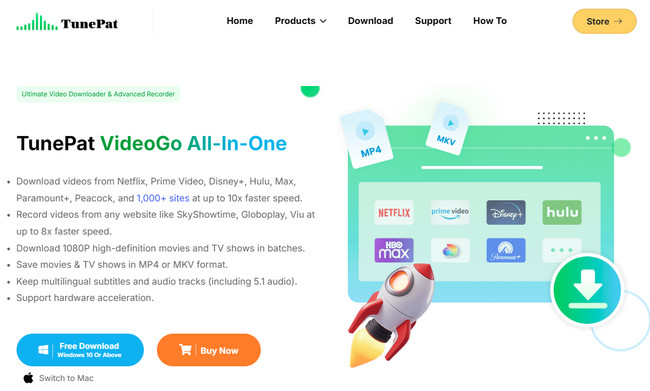
TunePat VideoGo All-In-One is a desktop video downloader designed to bring content from multiple streaming services and video websites into one workflow. Instead of switching between separate downloaders for different platforms, it combines support for major services such as Netflix, Amazon Prime Video, Disney+, Hulu, Max, Paramount+, Discovery+, Apple TV+, YouTube, and many others.
The software can save supported videos as MP4 or MKV, with options for video quality, audio tracks, subtitles, and H.264/H.265 codecs. TunePat advertises up to 8K for YouTube and up to 1080p for a range of subscription services, although the maximum quality varies by platform and title. It is available for Windows 10 or later and macOS 11 or later, making it suitable for users who want a desktop-based solution for offline viewing.
| Feature | Details |
|---|---|
| Supported Platforms | 1,000+ websites, including Netflix, Amazon Prime Video, Disney+, Hulu, Max, Paramount+, YouTube, Apple TV+, and more |
| Output Formats | MP4, MKV |
| Video Quality | Up to 1080p for many supported streaming services; up to 8K for YouTube |
| Audio | Multilingual audio tracks supported where available |
| Subtitles | External, Internal, and Hardcode options; Multiple languages |
| Batch Download | Supported |
| Download Speed | Up to 10x faster speed |
| Record Feature | Record any video in MP4 |
The specifications above reflect TunePat's current official information. In our testing, we focused on how these advertised features translate into actual day-to-day use, including platform access, video analysis, download performance, output quality, and the overall workflow. Those hands-on results are covered in the next section.

Looking for free movie websites that actually work? This guide covers 15 most visited free movie streaming sites, with clear pros, cons, and viewing tips. Learn More →
Download experience may vary depending on your network connection, computer configuration, and the streaming platform you are using. To provide a more accurate and transparent assessment, we have listed our test settings below.
| Testing Item | Details |
| Software | TunePat VideoGo All-In-One |
| Operating System | Windows 11 (64-bit) |
| Internet Connection | 500 Mbps home broadband |
| Output Format | MP4 and MKV |
| Video Quality Tested | 1080p, 4K, and 8K where available |
| Audio & Subtitle Tests | Multiple language tracks, 5.1 surround audio, and subtitles |
| Download Scenarios | Movies, TV episodes, and online videos from different supported platforms |
This section walks you through the general download process in TunePat VideoGo All-In-One. Since the software supports a wide range of streaming platforms and each service may have slightly different options, we can't cover every platform here. Instead, we've used a typical streaming service workflow to show you what the experience is like from start to finish.
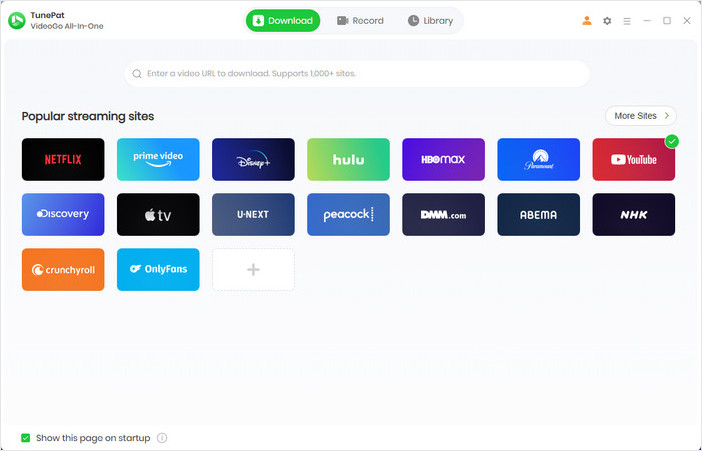
Step 1 Choose the streaming platform you want to use under the Download tab. After selecting a service, the TunePat built-in browser will open the website you selected. Follow the platform's instructions to log in to your account (depending on the platform).
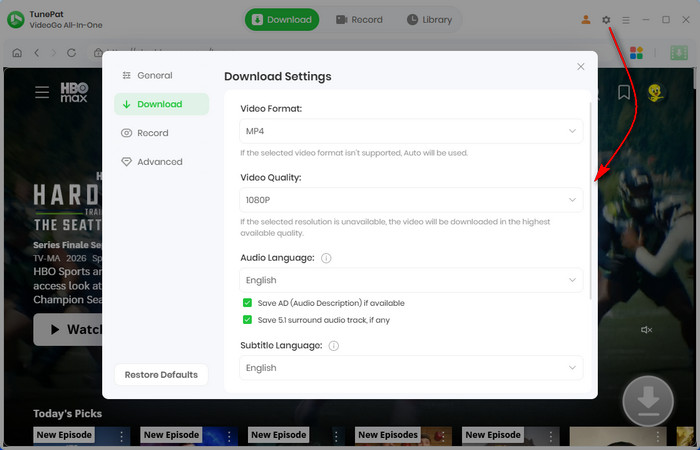
Step 2 Before downloading, click the Settings icon in the upper-right corner. Here you can choose the output format, video quality, audio language, subtitle language, subtitle type, and save location.
Step 3 Find the movie or TV show you want to download using TunePat's built-in browser. You can also search by title or paste a video URL. Once you open the title, click the green Download button. For TV shows, TunePat will then ask you to choose the season and episodes.

Step 4 For a TV show, select the season and episodes you want, then click Advanced Download. You can review the available video quality, audio tracks, and subtitles before starting the download. For a movie, TunePat takes you directly to the advanced download settings after you click the download button.
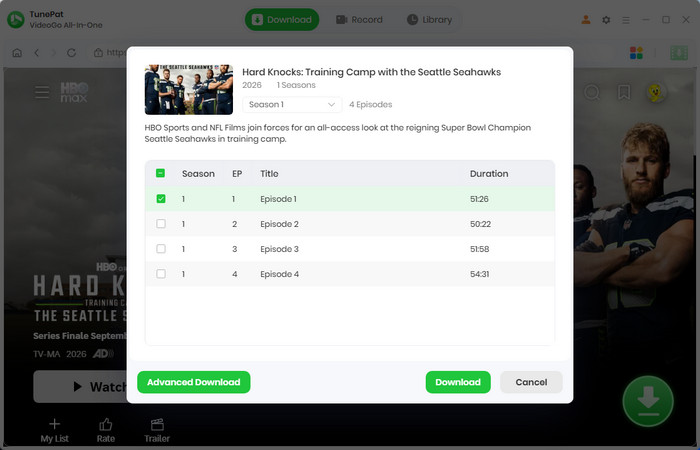
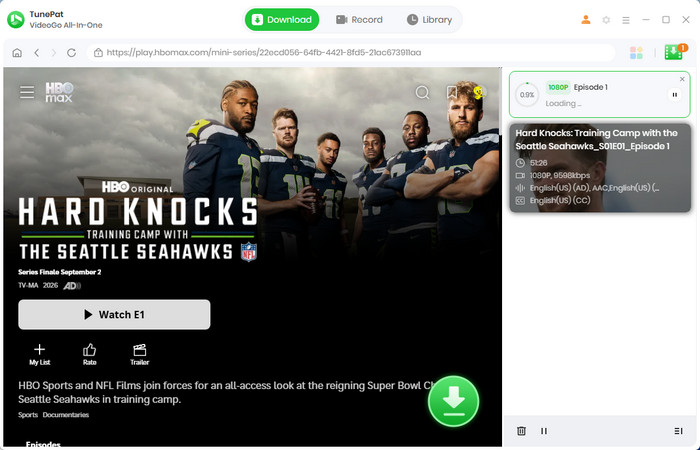
Step 5 Once everything looks good, click Download to start. If you want to download more titles, simply repeat the previous steps and add them to the task list.
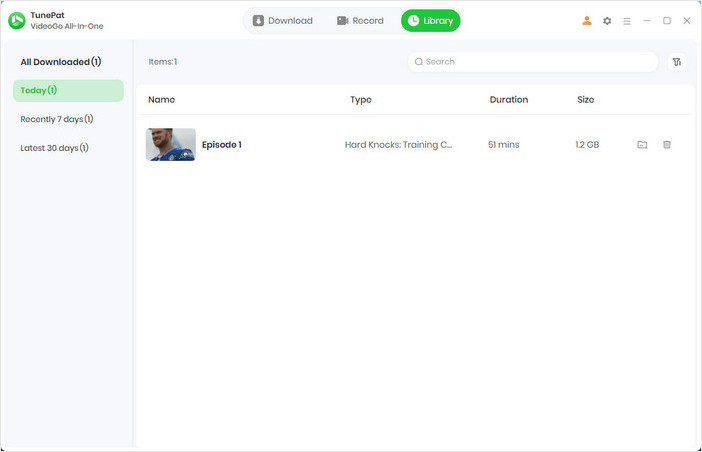
Step 6 When the download is finished, open the Library tab to view your completed videos. Click the file icon next to a title to open its saved location on your computer.
In this practical test, we focused on Netflix, Amazon Prime Video, Disney+, Hulu, HBO Max, and YouTube. We emphasized several aspects that users care about most in daily use—download smoothness, speed, video quality, and audio and subtitle options.
| Platform | Download Results | Avg. Speed | Video Quality | Audio & Subtitles |
| Netflix | 10 Movies & 16 TV Shows 100% success rate |
~10x | Up to 1080p |
Multilingual audio 5.1 surround audio Multilingual subtitles Internal / External / Hardcode |
| Amazon Prime Video | 10 Movies & 18 TV Shows 100% success rate |
~9x | Up to 1080p | |
| Hulu | 5 Movies & 10 TV Shows 100% success rate |
~10x | Up to 1080p | |
| HBO Max | 8 Movies & 6 TV Shows 100% success rate |
~9x | Up to 1080p | |
| YouTube | 20 Videos 100% success rate |
~10x | Up to 8K |
Multilingual audio Multilingual subtitles Internal / External / Hardcode |
| Disney+ | 5 Movies & 8 TV Shows 100% success rate |
~9x | Up to 720p |
Overall, TunePat VideoGo performed well across all the platforms we tested. All test videos downloaded successfully, typically at speeds 9-10 times faster, close to TunePat's claimed performance. In streaming services other than Disney+, video quality reached up to 1080p, and up to 8K on YouTube, with multilingual audio and subtitles available as expected. We also found that 5.1 surround sound was supported in all tested services except YouTube and Disney+. Therefore, the overall results are largely consistent with TunePat's claimed capabilities.
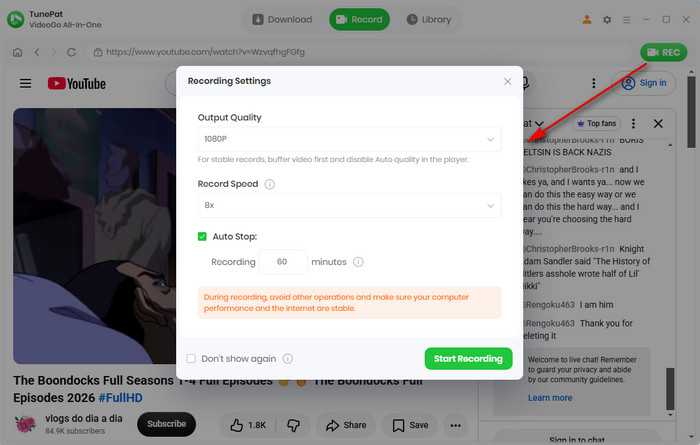
TunePat VideoGo All-In-One is mainly designed for downloading movies and TV shows from streaming platforms, but we also noticed that it comes with a built-in recording feature. In our testing, it proved to be a useful extra tool that lets you record any video as an MP4 file. Unlike traditional screen recorders that usually work at real-time 1x speed, TunePat can record at up to 8x speed, making it much faster for longer videos.
Other useful recording features include:

Top 8 Streaming Video Downloaders in 2026. Compare the best tools to download videos from popular platforms in up to 8K quality for offline viewing. Learn More →
We also checked user feedback on Trustpilot and Reviews.io to see how TunePat VideoGo performs beyond our own testing. Overall, the feedback is positive, with users commonly mentioning its easy-to-use interface, fast downloads, video quality, and helpful customer support.
There are also some negative experiences, mainly involving service-specific errors, registration code issues, or requests for additional options. These issues can sometimes occur when streaming platforms change their systems. If you run into a similar problem, you can submit feedback directly through the program or contact TunePat's support team at [email protected] for assistance.
Our own testing was more consistent. We successfully downloaded all tested titles from Netflix, Amazon Prime Video, Disney+, Hulu, HBO Max, and YouTube, achieving a 100% success rate. Download speeds reached around 9–10x, while video quality, audio, and subtitle options varied depending on the platform and title.
We also found the overall workflow straightforward, from selecting a platform and title to choosing output settings and checking the finished files. The built-in recording feature was another useful addition, especially with its 1x–8x recording speeds and up to 1080p output.
Overall, both user feedback and our hands-on results point to TunePat VideoGo as a capable and easy-to-use video downloader. Our testing was particularly positive, while user reviews remind us that performance can vary depending on the streaming service and individual use case. If you encounter an error code or have trouble receiving a registration code, you can use the Feedback option inside the program or contact TunePat's support team for help.

Looking for a reliable YouTube downloader to download HD videos? This detailed article summarizes the ten best YouTube video downloaders for you! Learn More →
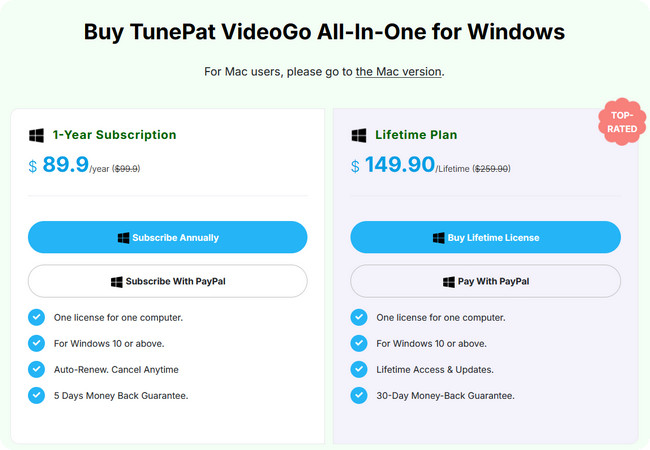
TunePat VideoGo All-In-One comes in several options, so the best choice depends mainly on how often you plan to use it and how many streaming services you need. At the time of writing, the 1-year plan costs $89.90, while the Lifetime plan costs $149.90. TunePat also offers individual platform downloaders for $79.90 Lifetime, as well as a separate recording option for users who do not need the full All-In-One package.
| Plan | Price | Best For |
| 1-Year | $89.90/year | Users who want to try the full feature set for a year |
| Lifetime | $149.90 | Frequent users who plan to use multiple platforms long term |
| Single-Platform | $79.90 Lifetime | Users who only need one specific streaming service |
| Record Feature | $79.90 Lifetime | Users who only need the recording feature |
The paid version removes the main limitations of the trial version, allowing full video downloads. TunePat also offers free updates and technical support, which is especially important for a tool that relies on an ever-changing streaming service.
Customer support is another factor worth considering. TunePat offers email technical support. When you encounter issues and provide feedback to their team, their support team states that they typically respond within 24 hours. An official FAQ also provides troubleshooting guides for registration problems and various download error codes.
The refund period is another useful safety net, but the terms differ by plan. TunePat currently offers a 5-day money-back period for monthly and yearly plans and a 30-day money-back period for Lifetime plans. The refund policy also lists specific conditions, so it is worth checking the terms rather than treating the guarantee as an unconditional trial period.
Planning to use it short-term? Grab the $89.90 annual plan. It gives you full feature access without a big upfront commitment. Just keep an eye on auto-renewal so you can cancel in time if you don't plan to stick around for year two.
Planning to use it for more than 2 years? Go for Lifetime ($149.90). The $60 price jump pays for itself quickly, making it by far the smartest long-term value for frequent downloaders.
Skip single-platform plans unless you're 100% committed to one site. If you stream across two or more services, paying a little extra for the All-In-One pass gives you way more freedom and bang for your buck.
Overall, TunePat VideoGo All-In-One performed well in our hands-on tests, with reliable downloads, good video quality, and useful audio and subtitle options. If its features and performance meet your needs, it is certainly a solid choice for downloading videos from multiple streaming platforms.
However, if you are looking for a similar all-in-one video downloader with a more budget-friendly lifetime option, NoteBurner All-In-One Video Downloader is worth considering.
It offers a similar set of core features to TunePat VideoGo All-In-One, including support for 1,000+ websites, batch downloads, video quality up to 1080p on supported streaming platforms and up to 8K for YouTube, multilingual audio tracks and subtitles, 5.1 surround sound and multiple subtitle options.
The main difference is the pricing model. NoteBurner's lifetime plan is $20 cheaper than TunePat's lifetime plan, priced at $129.95 compared with TunePat's $149.9. NoteBurner does not offer a yearly plan, but if you prefer a one-time purchase and want similar features without a subscription, it can be a more cost-effective alternative.

TunePat VideoGo All-In-One is a versatile video downloader and converter that supports 1,000+ popular streaming sites, including Netflix, Prime Video, Disney+, Hulu, HBO Max, YouTube, and Facebook. You can use it to download videos in high quality or save them for offline viewing.
The tool itself is simply a technical solution. If you use it for personal offline viewing, learning, or backup, and not for commercial distribution or sharing, it is generally considered reasonable use. Always follow your local laws and the terms of service of the streaming platform.
The default output formats are MP4 and MKV, which work with most devices, including iPhones, Android phones, tablets, TVs, and common media players.
TunePat supports video downloads in up to 1080p HD for most streaming platforms, while YouTube videos can be downloaded in up to 8K.
There are usually two reasons. First, the download speed can be affected by your internet connection or the streaming platform's servers. Second, streaming services often update their encryption methods. If you run into errors, make sure you're using the latest version of TunePat VideoGo.
TunePat offers a free trial, but it comes with some limitations, such as allowing you to download only the first 5 minutes of each video. For full-length downloads, you'll need a subscription or a lifetime license.
This review of the TunePat VideoGo All-In-One focuses on its features, user experience, and price. We tested it on major platforms including Netflix, Amazon Prime Video, Disney+, Hulu, HBO Max, and YouTube, and provided a detailed comparison of different pricing plans. After reading this review, you should have a clearer understanding of whether TunePat is worth buying and which plan is best for you. If you find TunePat's price a bit high, you can also check out NoteBurner All-In-One Video Downloader, which offers similar features at a more affordable price.
Note: Only the first 5 minutes of each video can be downloaded with the trial version. Please purchase a license to access full downloads. We recommend testing the trial version before making a purchase.